全局图标变更
这是一种全局更改 Discourse 图标的简便方法。
-
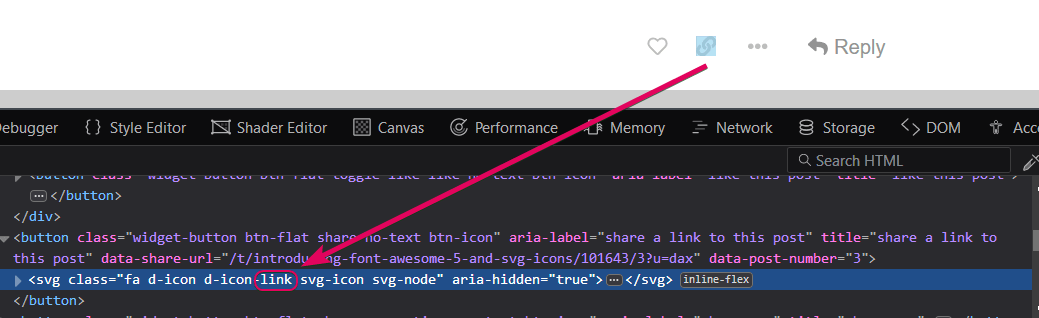
右键点击你想更改的图标,选择“检查元素”或“检查”(取决于浏览器)
-
找到图标名称
-
在这里 https://fontawesome.com/icons?d=gallery, 搜索一个新图标,例如 external-link-alt
-
自定义并将代码添加到你的
admin > customize > themes > edit code -> JS标签页中
// {theme}/javascripts/discourse/api-initializers/init-theme.gjs

import { apiInitializer } from "discourse/lib/api";

export default apiInitializer((api) => {
  api.replaceIcon("link", "external-link-tab");
});
- Discourse 默认未使用的图标必须添加到站点设置
svg icon subset中,然后强制刷新浏览器以查看已应用的更改。 结果: 所有 "link" 图标将被替换为 "external-link-tab"。
如果一个图标在其他页面上用于多个元素,例如徽章,该图标也会在那里被替换。
例外情况
请注意,已经有一个主题组件允许你更改点赞图标。我以这个情况作为示例
用于点赞的 "heart" 图标以其他名称('d-liked' 和 'd-unliked')硬编码,需要以不同于其他图标的方式处理,因此要将 :heart: 图标更改为 :+1: 图标:
api.replaceIcon("d-liked", "thumbs-up");
api.replaceIcon("d-unliked", "thumbs-o-up");

 但在徽章页面上图标仍然是 "heart":
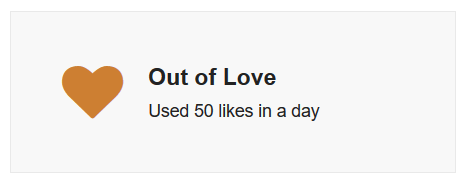 所以要在该页面上更改它,我们添加:
api.replaceIcon("heart", "thumbs-up");

另一个示例:
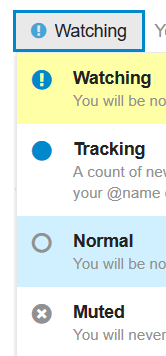
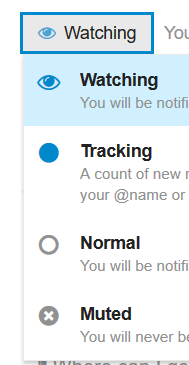
api.replaceIcon("d-watching", "eye");
更改了关注图标:
 [details="当然,在这里还可以查看涵盖跟踪状态、展开/收起、通知以及赞的其他例外情况。"]
const REPLACEMENTS = {
  "d-tracking": "bell",
  "d-muted": "discourse-bell-slash",
  "d-regular": "far-bell",
  "d-watching": "discourse-bell-exclamation",
  "d-watching-first": "discourse-bell-one",
  "d-drop-expanded": "caret-down",
  "d-drop-collapsed": "caret-right",
  "d-unliked": "far-heart",
  "d-liked": "heart",
  "d-post-share": "link",
  "d-topic-share": "link",
  "notification.mentioned": "at",
  "notification.group_mentioned": "users",
  "notification.quoted": "quote-right",
  "notification.replied": "reply",
  "notification.posted": "reply",
  "notification.edited": "pencil-alt",
  "notification.bookmark_reminder": "discourse-bookmark-clock",
  "notification.liked": "heart",
  "notification.liked_2": "heart",
  "notification.liked_many": "heart",
  "notification.liked_consolidated": "heart",
  "notification.private_message": "far-envelope",
  "notification.invited_to_private_message": "far-envelope",
  "notification.invited_to_topic": "hand-point-right",
  "notification.invitee_accepted": "user",
  "notification.moved_post": "sign-out-alt",
  "notification.linked": "link",
  "notification.granted_badge": "certificate",
  "notification.topic_reminder": "far-clock",
  "notification.watching_first_post": "discourse-bell-one",
  "notification.group_message_summary": "users",
  "notification.post_approved": "check",
  "notification.membership_request_accepted": "user-plus",
  "notification.membership_request_consolidated": "users",
  "notification.reaction": "bell",
  "notification.votes_released": "plus",
  "notification.chat_quoted": "quote-right",
};
参考:discourse/icon-library.ts at main · discourse/discourse (github.com) [/details]
欢迎创建其他主题组件,并在我们的 #customization:theme-component 类别中分享!
这篇文档对你有帮助吗?
谢谢你的反馈!