True / False
Description
The True / False field allows you to select a value that is either 1 or 0.
Screenshots
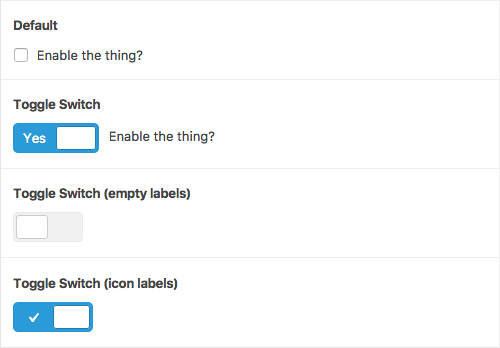
The True / False field interface
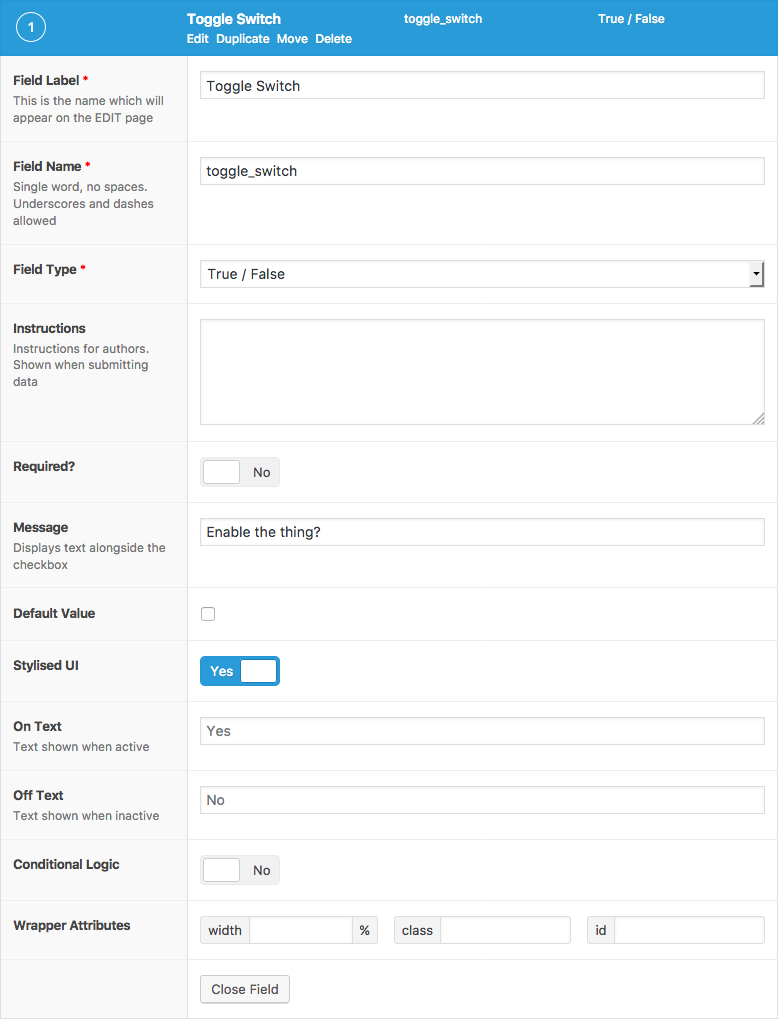
The True / False field settings
Changelog
- Added
UIsetting in version 5.5.0. - Added
On Textsetting in version 5.5.0. - Added
Off Textsetting in version 5.5.0.
Settings
- Message
The text displayed alongside the toggle. - Default Value
Specifies the default state selected when first editing the field’s value. - Stylized UI
Changes the default checkbox input into a stylized toggle switch. - On Text
The text displayed within the stylized toggle switch. Defaults to ‘Yes’. HTML may be entered for icons or custom markup. - Off Text
The text displayed within the stylized toggle switch. Defaults to ‘No’. HTML may be entered for icons or custom markup.
Template usage
The True / False field returns a Boolean value of either true or false.
Note that the actual value saved into the database is an integer of either 1 or 0.
Conditional
This example demonstrates how to use the value of ‘enable_sidebar’ to conditionally do a task.
<?php
if( get_field('color') ) {
    // Do something.
}
Query Posts
This example demonstrates how to query posts that have a true value for the field ‘show_in_sidebar’.
<?php

$posts = get_posts( array(
    'meta_query' => array(
        array(
            'key'   => 'show_in_sidebar',
            'value' => '1',
        )
    )
) );

if( $posts ) {
    foreach( $posts as $post ) {
        // Do something.
    }
}
这篇文档对你有帮助吗?
谢谢你的反馈!