register graphql field with argument
title: "Register GraphQL Field with Argument" wordpressUri: "/recipes/register-graphql-field-with-argument/" wordpressId: "2494" group: "Custom Fields" summary: "This is an example of registering a field with an argument showing how to use the argument in a resolver. add_action( 'graphql_register_types', function() { register_graphql_field( 'RootQuery', 'myNewField', [ 'type' =>…"
This is an example of registering a field with an argument showing how to use the argument in a resolver.
add_action( 'graphql_register_types', function() {

	register_graphql_field( 'RootQuery', 'myNewField', [
		'type' => 'String',
		'args' => [
			'myArg' => [
				'type' => 'String',
                                'description' => __( 'Description for how the argument will impact the field resolver', 'your-textdomain' ),
			],
		],
		'resolve' => function( $source, $args, $context, $info ) {
			if ( isset( $args['myArg'] ) ) {
				return 'The value of myArg is: ' . $args['myArg'];
			}
			return 'test';
		},
	]);

});
This will register a new field (myNewField ) to the RootQuery, and adds an argument to the field (myArg). The resolve function checks to see if that arg is set, and if so, it returns the value, if not it returns test.
We can query this like so:
query {
  myNewField
}
And the results will be:
{
  "data": {
    "myNewField": "test"
  }
}
Now, we can pass a value to the argument like so:
query {
  myNewField( myArg: "something" )
}
and the results will be:
{
  "data": {
    "myNewField": "The value of myArg is: something"
  }
}
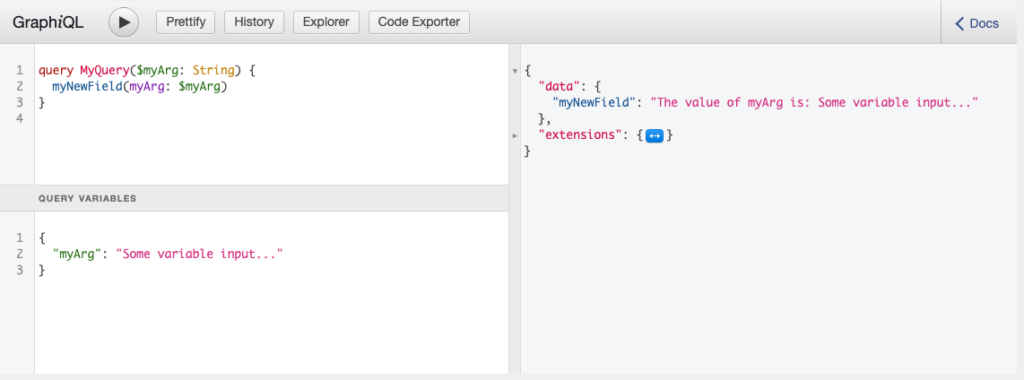
Now, you can introduce variables like so:
query MyQuery($myArg:String) {
  myNewField( myArg: $myArg )
}
And then you can pass variables to the request. Here’s an example of using a variable in GraphiQL:
这篇文档对你有帮助吗?
谢谢你的反馈!