Overview
We strive to bring Artificial Intelligence features to Nextcloud. This section highlights these features, how they work and where to find them. All of these features are completely optional. If you want to have them on your server, you need to install them via separate Nextcloud Apps.
Overview of AI features
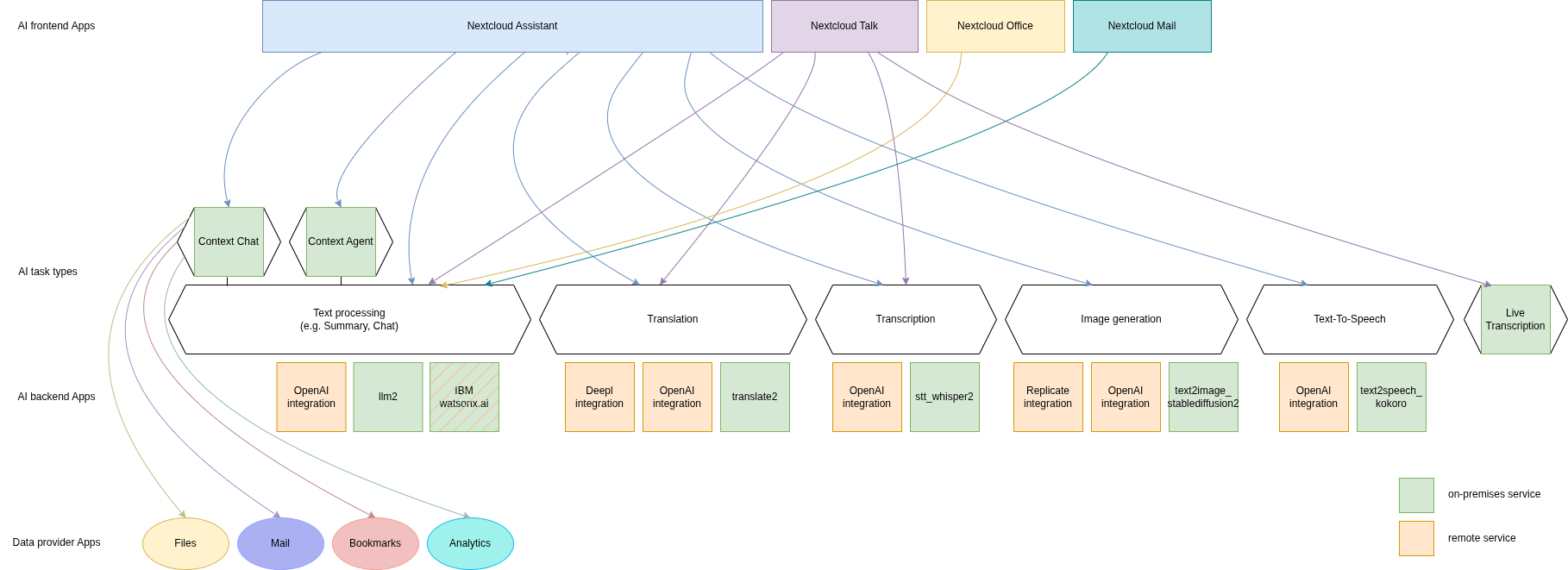
Nextcloud uses modularity to separate raw AI functionality from the Graphical User interfaces and apps that make use of said functionality. Each instance can thus make use of various backends that provide the functionality for the same frontends and the same functionality can be implemented by multiple apps using on-premises processing or third-party AI service providers.
Ethical AI Rating
Until Hub 3, we succeeded in offering features without relying on proprietary blobs or third party services. Yet, while there is a large community developing ethical, safe and privacy-respecting technologies, there are many other relevant technologies users might want to use. We want to provide users with these cutting-edge technologies – but also be transparent. For some use cases, ChatGPT might be a reasonable solution, while for more private, professional or sensitive data, it is paramount to have a local, on-prem, open solution. To differentiate these, we developed an Ethical AI Rating.
The rating has four levels:
- Red
- Orange
- Yellow
- Green
It is based on points from these factors:
- Is the software (both for inferencing and training) under a free and open source license?
- Is the trained model freely available for self-hosting?
- Is the training data available and free to use?
If all of these points are met, we give a Green label. If none are met, it is Red. If 1 condition is met, it is Orange and if 2 conditions are met, Yellow.
Features used by other apps
Some of our AI features are realized as generic APIs that any app can use and any app can provide an implementation for by registering a provider. So far, these are Machine translation, Speech-To-Text, Text-To-Speech, Image generation, Text processing and Context Chat.
Text processing
As you can see in the table above we have multiple apps offering text processing using Large language models. In downstream apps like Context Chat and assistant, users can use the text processing functionality regardless of which app implements it behind the scenes.
Frontend apps
- Assistant for offering a graphical UI for the various tasks, a smart picker and "Chat with AI" functionality
- Mail for summarizing mail threads (see the Nextcloud Mail docs for how to enable this)
- Summary Bot for summarizing chat histories in Talk
- Talk for summarizing chat history (see Nextcloud Talk docs for how to enable this)
- Text for offering an inline graphical UI for the various tasks
- Collectives integrating Assistant through the smart picker to offer a graphical UI for the various tasks
- Notes integrating Assistant through the smart picker to offer a graphical UI for the various tasks
- Whiteboard integrating Assistant through the smart picker to offer a graphical UI for the various tasks
- Deck integrating Assistant through the smart picker to offer a graphical UI for the various tasks
- Nextcloud Office integrating Assistant through the smart picker to offer a graphical UI for the various tasks in documents
- Desktop Clients for simple "Chat with AI"
Backend apps
- llm2 - Runs open source AI LLM models on your own server hardware (Customer support available upon request)
- OpenAI and LocalAI integration (via OpenAI API) - Integrates with the OpenAI API to provide AI functionality from OpenAI servers (Customer support available upon request; see AI as a Service)
- IBM watsonx.ai integration (via IBM watsonx.ai as a Service) - Integrates with the IBM watsonx.ai API to provide AI functionality from IBM Cloud servers (Customer support available upon request; see AI as a Service)
Machine translation
As you can see in the table above we have multiple apps offering machine translation capabilities. Each app brings its own set of supported languages. In downstream apps like the Text app, users can use the translation functionality regardless of which app implements it behind the scenes.
Frontend apps
- Assistant offering a graphical translation UI
- Analytics for translating graph labels
- Talk for translating messages and live translations in calls in conjunction with the Live Transcription app
- Deck for offering a translation UI in the card description
- Text for offering the translation menu
- Notes for offering a translation UI in the note content
- Collectives for offering a translation UI in the page content
- Whiteboard for offering a translation UI through the assistant
- Nextcloud Office for offering translation UI in the document content
Backend apps
- translate2 (ExApp) - Runs open source AI translation models locally on your own server hardware (Customer support available upon request)
- OpenAI and LocalAI integration (via OpenAI API) - Integrates with the OpenAI API to provide AI functionality from OpenAI servers (Customer support available upon request; see AI as a Service)
- DeepL integration - Integrates with the deepl API to provide translation functionality from Deepl.com servers (Only community supported)
Speech-To-Text
As you can see in the table above we have multiple apps offering Speech-To-Text capabilities. In downstream apps like the Talk app, users can use the transcription functionality regardless of which app implements it behind the scenes.
Frontend apps
- Assistant offering a graphical translation UI, a smart picker and Audio Chat
- Talk for transcribing calls (see Nextcloud Talk docs for how to enable this)
Backend apps
- stt_whisper2 - Runs open weights AI Speech-To-Text models on your own server hardware (Customer support available upon request)
- OpenAI and LocalAI integration (via OpenAI API) - Integrates with the OpenAI API to provide AI functionality from OpenAI servers (Customer support available upon request; see AI as a Service)
Image generation
As you can see in the table above we have multiple apps offering Image generation capabilities. In downstream apps like the Text-to-Image helper app, users can use the image generation functionality regardless of which app implements it behind the scenes.
Frontend apps
- Assistant for offering a graphical UI and a smart picker
- Deck for inserting images with the smart picker
- Text for inserting images with the assistant and smart picker
- Notes for inserting images with the assistant and smart picker
- Collectives for inserting images with the assistant and smart picker
- Whiteboard for inserting images with the assistant and smart picker, generating diagrams and flowcharts with Mermaid
- Nextcloud Office for inserting images with the assistant and smart picker
Backend apps
- Local Stable Diffusion 2 (ExApp) (Customer support available upon request)
- OpenAI and LocalAI integration (via OpenAI API) - Integrates with the OpenAI API to provide AI functionality from OpenAI servers (Customer support available upon request; see AI as a Service)
- integration_replicate - Integrates with the replicate API to provide AI functionality from replicate servers (see AI as a Service)
Text-To-Speech
As you can see in the table above we have multiple apps offering speech generation capabilities. In downstream apps like the assistant app, users can use the speech generation functionality regardless of which app implements it behind the scenes.
Frontend apps
- Assistant for offering a audio chat
Backend apps
- OpenAI and LocalAI integration (via OpenAI API) - Integrates with the OpenAI API to provide AI functionality from OpenAI servers (Customer support available upon request; see AI as a Service)
- Local Text To Speech (ExApp) (Customer support available upon request)
Context Chat
Our Context Chat feature was introduced in Nextcloud Hub 7 (v28). It allows asking questions to the assistant related to your documents in Nextcloud. You will need to install both the context_chat app as well as the context_chat_backend External App. Be prepared that things might break or be a little rough around the edges. We look forward to your feedback!
Frontend apps
- Assistant for offering a graphical UI for the context chat tasks
- Nextcloud Context Agent for offering Context chat as a tool that the agent can execute in the "Chat with AI" feature
Backend apps
- context_chat + context_chat_backend - (Customer support available upon request)
Provider apps
Apps can integrate their content with Context Chat to make it available for querying using Context Chat. The following apps have implemented this integration so far:
Context Chat Search
Our Context Chat Search feature allows searching through your documents using natural language. You will need to install both the context_chat app as well as the context_chat_backend External App. We look forward to your feedback!
Frontend apps
- Assistant for offering a graphical UI for the context chat search tasks
Backend apps
- context_chat + context_chat_backend - (Customer support available upon request)
Provider apps
See Context Chat section above.
Context Agent
Our Context Agent feature was introduced in Nextcloud Hub 9 (v30). It allows asking the assistant to execute tasks related to Nextcloud. You will need to install both the context_agent app as well as a text processing provider.
Frontend apps
- Assistant for offering a graphical UI for the "Chat with AI" feature
Backend apps
- Nextcloud Context Agent for agentic AI capabilities in the "Chat with AI" feature (Customer support available upon request)
Provider apps
- llm2 - Runs open source AI LLM models on your own server hardware (Customer support available upon request)
- OpenAI and LocalAI integration (via OpenAI API) - Integrates with the OpenAI API to provide AI functionality from OpenAI servers (Customer support available upon request; see AI as a Service)
Document generation
Since Hub 11 you can let Nextcloud automatically generate Office documents with content. This functionality is available in the assistant app and made possible by the Nextcloud Office app.
Frontend apps
- Assistant for offering a graphical UI for the context chat search tasks
Backend apps
Provider apps
- llm2 - Runs open source AI LLM models on your own server hardware (Customer support available upon request)
- OpenAI and LocalAI integration (via OpenAI API) - Integrates with the OpenAI API to provide AI functionality from OpenAI servers (Customer support available upon request; see AI as a Service)
- IBM watsonx.ai integration (via IBM watsonx.ai as a Service) - Integrates with the IBM watsonx.ai API to provide AI functionality from IBM Cloud servers (Customer support available upon request; see AI as a Service)
Live transcription
Since Hub 25 Autumn you can let Nextcloud automatically generate subtitles for video and audio calls in Nextcloud Talk.
Frontend apps
- Talk for displaying the subtitles in calls
Backend apps
- live_transcription - Runs open weights AI Speech-To-Text models on your own server hardware (Customer support available upon request)
Optical Character Recognition
As you can see in the table above we have multiple apps offering OCR capabilities. In downstream apps like the assistant app, users can use OCR functionality regardless of which app implements it behind the scenes.
Frontend apps
Backend apps
- OpenAI and LocalAI integration (via OpenAI API) >= v5.0.0 - Integrates with the OpenAI API to provide AI functionality from OpenAI servers (Customer support available upon request; see AI as a Service)
- Local OCR: PaddleOCR (ExApp) - (Customer support available upon request)
Windmill workflows
You can use the AI endpoints in your Windmill workflows. Some example workflows showcasing the possibilities of combining Windmill workflows with Nextcloud AI are available on the Windmill Hub
Improve AI task pickup speed
Most AI tasks will be run as part of the background job system in Nextcloud which only runs jobs every 5 minutes by default. To pick up scheduled jobs faster you can set up background job workers inside your Nextcloud main server/container that process AI tasks as soon as they are scheduled. If the PHP code or the Nextcloud settings values are changed while a worker is running, those changes won't be effective inside the runner. For that reason, the worker needs to be restarted regularly. It is done with a timeout of N seconds which means any changes to the settings or the code will be picked up after N seconds (worst case scenario). This timeout does not, in any way, affect the processing or the timeout of the AI tasks.
Changed in version 32.0.7: The command to run the worker has changed from
background-job:workertotaskprocessing:worker. If you are running an older version of Nextcloud, please use the old command.
Screen or tmux session
Run the following occ command inside a screen or a tmux session, preferably 4 or more times for parallel processing of multiple requests by different or the same user (and as a requirement for some apps like context_chat). It would be best to run one command per screen session or per tmux window/pane to keep the logs visible and the worker easily restartable.
set -e; while true; do sudo -E -u www-data php occ taskprocessing:worker -v -t 60; done
For Nextcloud-AIO you should use this command on the host server.
set -e; while true; do docker exec -it nextcloud-aio-nextcloud sudo -E -u www-data php occ taskprocessing:worker -v -t 60; done
You may want to adjust the number of workers and the timeout (in seconds) to your needs. The logs of the worker can be checked by attaching to the screen or tmux session.
Systemd service
- Create a systemd service file in
/etc/systemd/system/nextcloud-ai-worker@.servicewith the following content:
[Unit]
Description=Nextcloud AI worker %i
After=network.target

[Service]
ExecStart=/opt/nextcloud-ai-worker/taskprocessing.sh %i
Restart=always
StartLimitInterval=60
StartLimitBurst=10

[Install]
WantedBy=multi-user.target
- Create a shell script in
/opt/nextcloud-ai-worker/taskprocessing.shwith the following content and make sure to make it executable:
#!/bin/sh
echo "Starting Nextcloud AI Worker $1"
cd /path/to/nextcloud
sudo -E -u www-data php occ taskprocessing:worker -v -t 60
You may want to adjust the timeout to your needs (in seconds).
- Enable and start the service 4 or more times:
for i in {1..4}; do systemctl enable --now nextcloud-ai-worker@$i.service; done
The status of the workers can be checked with (replace 1 with the worker number):
systemctl status nextcloud-ai-worker@1.service
The list of workers can be checked with:
systemctl list-units --type=service | grep nextcloud-ai-worker
The complete logs of the workers can be checked with (replace 1 with the worker number):
journalctl -xeu nextcloud-ai-worker@1.service -f
Frequently Asked Questions
Why is my prompt slow?
Reasons for slow performance from a user perspective can be
- Using CPU processing instead of GPU (sometimes this limit is imposed by the used app)
- High user demand for the feature: User prompts and AI tasks are usually processed in the order they are received, which can cause delays when a lot of users access these features at the same time.