FTP/FTPS
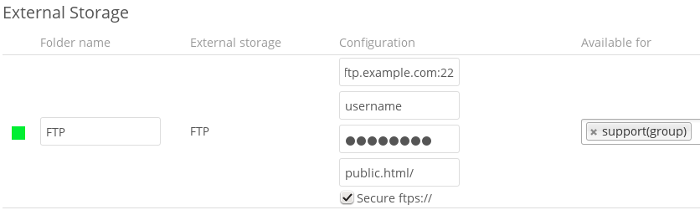
To connect to an FTP server, you will need:
- A folder name for your local mountpoint; the folder will be created if it does not exist
- The URL of the FTP server
- Port number (default: 21)
- FTP server username and password
- Remote Subfolder, the FTP directory to mount in Nextcloud. Nextcloud defaults to the root directory. If you specify a subfolder you must leave off the leading slash. For example,
public_html/images
Your new mountpoint is available to all users by default, and you may restrict access by entering specific users or groups in the Available for field.
Optionally, Nextcloud can use FTPS (FTP over SSL) by checking Secure ftps://. This requires additional configuration with your root certificate if the FTP server uses a self-signed certificate.
提示
The external storage
FTP/FTPSneeds theallow_url_fopenPHP setting to be set to1. When having connection problems make sure that it is not set to0in yourphp.ini. See PHP version and information to learn how to find the rightphp.inifile to edit.
See External Storage for additional mount options and information.
FTP uses the password authentication scheme; see External Storage authentication mechanisms for more information on authentication schemes.
谢谢你的反馈!