# Adding a Reference Field

## Goal

Add a reference field so that recipes can be linked to the vendor that has
submitted it.
## Prerequisite knowledge

* [Adding Basic Fields to a Content Type](/link/722)
* [Concept: Reference Fields](/link/723)
* [Adding a Content Type](/link/720)
## Site prerequisites

The Recipe and Vendor content types must exist. See [Adding a Content Type](/link/720).
## Steps

1. In the _Manage_ administrative menu, navigate to _Structure_ > _Content
    types_ (_admin/structure/types_). Then click _Manage fields_ in the
    dropdown button for the Recipe content type. The _Manage fields_ page appears.
1. Click _Create a new field_. The _Add field_ page appears. Choose the
    _Reference_ field type from the _Choose a field type_ options. Click _Continue_.
    The _Add field_ page appears with a form to configure the field label.
    ![Adding a reference field to a content type](https://docs.cocobook.com/uploads/images/gallery/2026-10/structure-adding-reference-add-field.png)
1. Fill in the fields as shown below. Click _Save and continue_.
    <table>
      <thead>
        <tr>
          <th>Field name</th>
          <th>Explanation</th>
          <th>Value</th>
        </tr>
      </thead>
      <tbody>
        <tr>
          <td>Label</td>
          <td>The title you want to give the field</td>
          <td>Submitted by</td>
        </tr>
        <tr>
          <td>Choose an option below:</td>
          <td>Type of content to reference</td>
          <td>Content</td>
        </tr>
      </tbody>
    </table>

    ![Adding a reference field to a content type](https://docs.cocobook.com/uploads/images/gallery/2026-10/structure-adding-reference-add-field-label.png)

1. The page Submitted by appears which lets you set the allowed number of
    values. Fill in the fields as shown below. Click _Save settings_.
    <table>
      <thead>
        <tr>
          <th>Field name</th>
          <th>Explanation</th>
          <th>Value</th>
        </tr>
      </thead>
      <tbody>
        <tr>
          <td>Type of item to reference</td>
          <td>Option to select the type of referenced entity</td>
          <td>Content</td>
        </tr>
        <tr>
          <td>Allowed number of values</td>
          <td>Specify the count of values associated with the field</td>
          <td>Limited, 1</td>
        </tr>
      </tbody>
    </table>

    ![Storage configuration of a reference field ](https://docs.cocobook.com/uploads/images/gallery/2026-10/structure-adding-reference-set-field-basic.png)

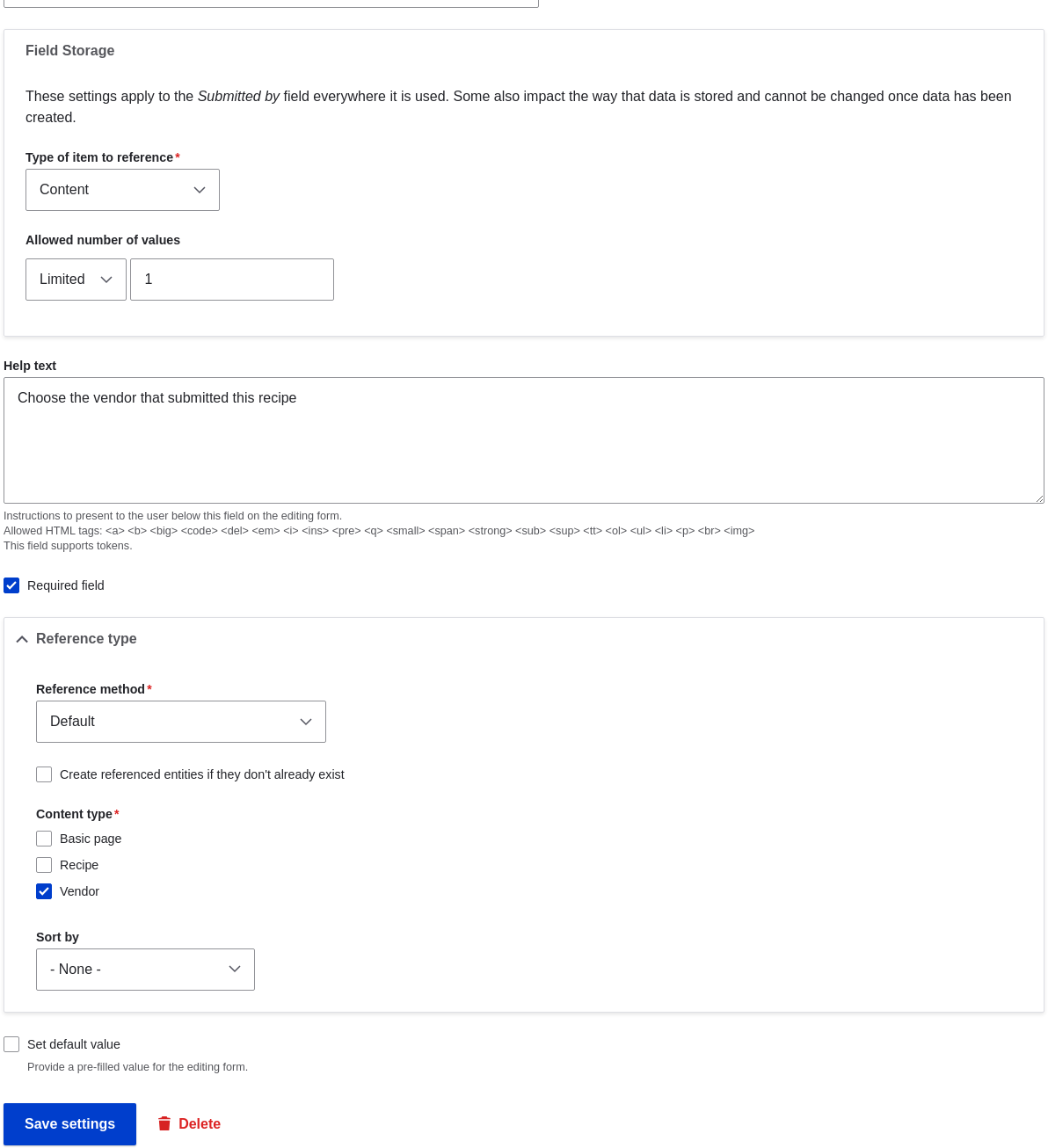
1. The page _Submitted by settings for Recipe_ appears which allows you to
    configure the field. Fill in the fields as shown below. Click _Save settings_.
    <table>
      <thead>
        <tr>
          <th>Field name</th>
          <th>Explanation</th>
          <th>Value</th>
        </tr>
      </thead>
      <tbody>
        <tr>
          <td>Label</td>
          <td>Title shown for this field on the page</td>
          <td>Submitted by</td>
        </tr>
        <tr>
          <td>Help text</td>
          <td>Brief text aiding the person creating content</td>
          <td>Choose the vendor that submitted this recipe</td>
        </tr>
        <tr>
          <td>Required field</td>
          <td>Whether a value has to be provided or not</td>
          <td>Checked</td>
        </tr>
        <tr>
          <td>Reference type > Reference method</td>
          <td>Option to select reference method</td>
          <td>Default</td>
        </tr>
        <tr>
          <td>Reference type > Content type</td>
          <td>Specify the content type</td>
          <td>Vendor</td>
        </tr>
        <tr>
          <td>Reference type > Sort by</td>
          <td>Sorting field</td>
          <td>Vendor name</td>
        </tr>
        <tr>
          <td>Reference type > Sort direction</td>
          <td>Sorting order</td>
          <td>Ascending</td>
        </tr>
      </tbody>
    </table>

    <img src="https://docs.cocobook.com/uploads/images/gallery/2026-10/structure-adding-reference-field-settings.png" alt="Settings for a reference field " width="100%" />

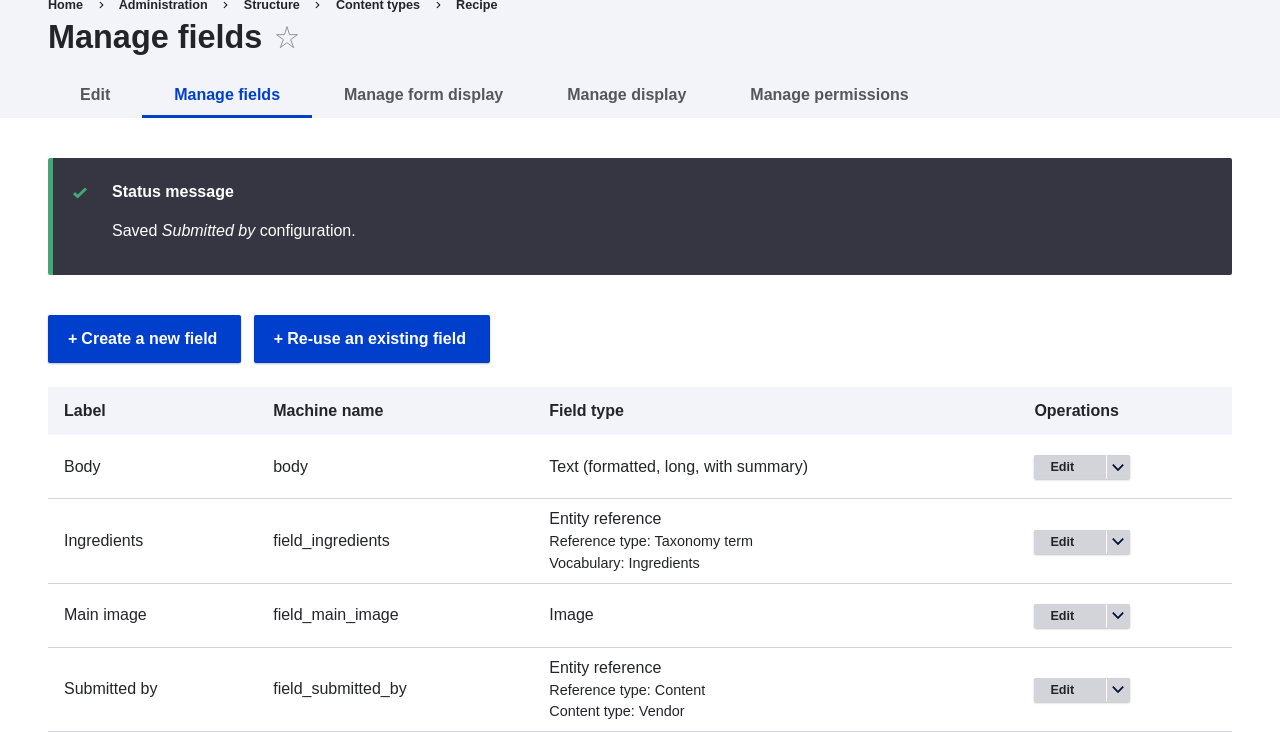
1. The Submitted by field has been added to the content type.
    <img src="https://docs.cocobook.com/uploads/images/gallery/2026-10/structure-adding-reference-manage-fields.png" alt="Manage fields page for the Recipe content type" width="100%" />

## Videos

[Adding a Reference Field](https://www.youtube.com/watch?v=hAhWiqPlKh0)