# Translating Content

## Goal

Translate the home page to Spanish.
## Prerequisite knowledge

[Concept: User Interface, Configuration, and Content translation](/link/695)
## Site prerequisites

* The Home content item must exist. See [Creating a Content Item](/link/713).
* The core Content Translation module must be installed, and your site must
have at least two languages. See [Adding a Language](/link/755).
* The _Basic page_ content type must be configured to be translatable. See
[Configuring Content Translation](/link/756).
## Steps

1. In the _Manage_ administrative menu, navigate to _Content_ (_admin/content_).
1. Locate the home page. You can search for it by entering "Home" in the title
    field.
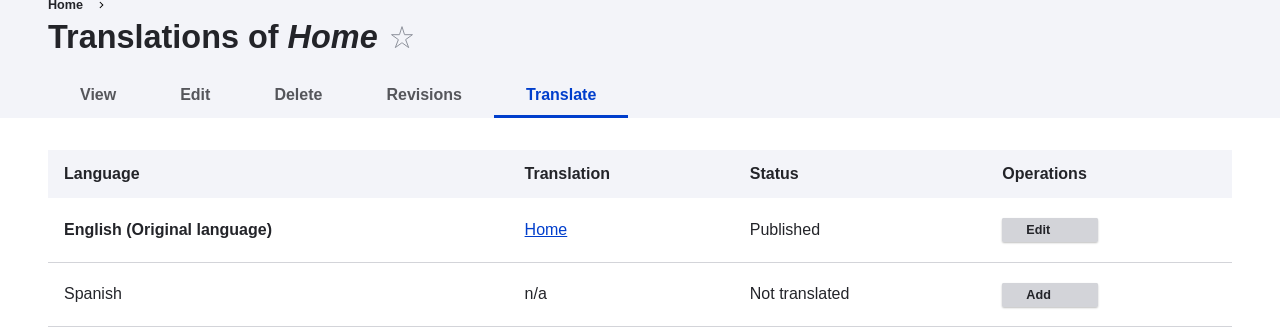
1. Select _Translate_ from the dropdown button in the row of the Home content
    item. The page _Translations of Home_ appears.
1. Click _Add_ in the row _Spanish_.
    <img src="https://docs.cocobook.com/uploads/images/gallery/2026-10/language-content-translate-add.png" alt="Adding a content translation" width="100%" />
1. Note that the user interface has switched to Spanish. To switch it back to
    English, remove the first instance of _es_ in the browser's URL. For
    example, if your URL looks like _example.com/es/node/5/translations/add/en/es_,
    remove the _es_ that comes immediately after _example.com_.
1. Fill in the fields as shown below.
    <table>
      <thead>
        <tr>
          <th>Field name</th>
          <th>Explanation</th>
          <th>Value</th>
        </tr>
      </thead>
      <tbody>
        <tr>
          <td>Title</td>
          <td>Translated title of the page</td>
          <td>Página principal</td>
        </tr>
        <tr>
          <td>Body</td>
          <td>Translated body of the page</td>
          <td></td>
        </tr>
        <tr>
          <td>URL alias > URL alias</td>
          <td>Translated address of the webpage</td>
          <td>pagina-principal</td>
        </tr>
      </tbody>
    </table>
1. Click _Save (this translation)_.
1. Go to your site's home page to view the newly translated page.

## Expand your understanding

* Follow the steps above to translate more content on your site.
* [Translating Configuration](/link/758)
## Videos

[Translating Content](https://www.youtube.com/watch?v=TOalcUYD5zM)
