# Configuring Content Translation

## Goal

Make _Custom block_, _Custom menu link_, and _Content_ entity types
translatable. Select specific subtypes and set which fields of these can be
translated.
## Prerequisite knowledge

* [Concept: Content Entities and Fields](/link/691)
* [Concept: User Interface, Configuration, and Content translation](/link/695)
## Site prerequisites

The core Content Translation module must be installed, and your site must
have at least two languages. See [Adding a Language](/link/755).
## Steps

1. In the _Manage_ administrative menu, navigate to _Configuration_ > _Regional
    and language_ > _Content language and translation_
    (_admin/config/regional/content-language_).
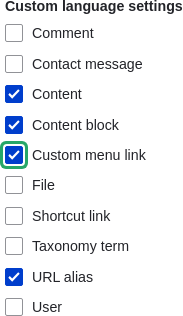
1. Under _Custom language settings_, check _Content_,
    _Content block_ and _Custom menu link_ to make these entity types translatable.
    <img src="https://docs.cocobook.com/uploads/images/gallery/2026-10/language-content-config-custom.png" alt="Custom language settings checklist" width="193px" />
1. Configuration options appear for _Content_, _Content block_ and  _Custom menu
    link_. Choose the subtypes you want to translate for each entity
    type. Check _Basic page_ for _Content_, _Basic block_ for _Content block_ and
    _Custom menu link_ for _Custom menu link_.
1. Verify the settings for the entity types as shown below:
    <table>
      <thead>
        <tr>
          <th>Field name</th>
          <th>Explanation</th>
          <th>Example value</th>
        </tr>
      </thead>
      <tbody>
        <tr>
          <td>Default language</td>
          <td>The default language for the entity subtype</td>
          <td>Site's default language (English)</td>
        </tr>
        <tr>
          <td>Show language selector on create and edit pages</td>
          <td>Whether or not the language selector should be shown while editing and creating content</td>
          <td>Checked</td>
        </tr>
      </tbody>
    </table>

    ![Default language and translatability for content types](https://docs.cocobook.com/uploads/images/gallery/2026-10/language-content-config-content.png)

1. Choose the fields that should be translatable for _Basic page_ as shown in the
    table below. If a field is not translation-dependent, leave it unchecked.
    <table>
      <thead>
        <tr>
          <th>Field name</th>
          <th>Explanation</th>
          <th>Example value</th>
        </tr>
      </thead>
      <tbody>
        <tr>
          <td>Title</td>
          <td>The title of the content</td>
          <td>Checked</td>
        </tr>
        <tr>
          <td>Authored by</td>
          <td>The author</td>
          <td>Unchecked</td>
        </tr>
        <tr>
          <td>Published</td>
          <td>Whether the content has been published or not</td>
          <td>Checked</td>
        </tr>
        <tr>
          <td>Authored on</td>
          <td>Date of publishing</td>
          <td>Unchecked</td>
        </tr>
        <tr>
          <td>Changed</td>
          <td>Date of last update</td>
          <td>Unchecked</td>
        </tr>
        <tr>
          <td>Promoted to front page</td>
          <td>Whether the content will be included in some content views</td>
          <td>Unchecked</td>
        </tr>
        <tr>
          <td>Sticky at top of lists</td>
          <td>Whether the content will be displayed first in some content views</td>
          <td>Unchecked</td>
        </tr>
        <tr>
          <td>URL alias</td>
          <td>Nicer URL for the content</td>
          <td>Checked</td>
        </tr>
        <tr>
          <td>Body</td>
          <td>The main content of the page</td>
          <td>Checked</td>
        </tr>
      </tbody>
    </table>

    ![Translatable content entity subtypes' fields checklist](https://docs.cocobook.com/uploads/images/gallery/2026-10/language-content-config-basic-page.png)

1. Similarly, check the appropriate boxes for translatable fields belonging to
    _Basic block_ and _Custom menu link_.
1. Click _Save configuration_.

## Expand your understanding

* [Translating Configuration](/link/758)
* [Translating Content](/link/757)
## Videos

[Configuring Content Translation](https://www.youtube.com/watch?v=b_w904_pcTY)

## Additional resources

* [Blog post "Multilingual Drupal 8 tidbits, part 5"](http://hojtsy.hu/blog/2013-jun-21/drupal-8-multilingual-tidbits-5-almost-limitless-language-assignment)
* [Blog post "Multilingual Drupal 8 tidbits, part 17"](http://hojtsy.hu/blog/2015-jan-27/drupal-8-multilingual-tidbits-17-content-translation-basics)
