Carbon Fields 开发者文档
Carbon Fields 开发者文档,介绍字段容器与主题/插件集成。
- Overview
- Plugin Quickstart
- Quickstart
- Section-based page layout / Flexible Content
- Adding social links to your site's header
- Repeating Groups
- Changing sidebar options
- Term meta
- Using field values
- Plugin Quickstart
- Quickstart
- Support for Bedrock & similar frameworks
- Compacting input variables to fit within PHP's max_input_vars
- Field Name Patterns
- JavaScript API
- JavaScript Hooks
- PHP Hooks
- Integrating with WP_Query
- Custom Datastore
- Programatically updating field values
- WPML Support
- Comment Meta
- Condition Types
- Conditional Display
- Gutenberg Blocks
- Nav Menu Item
- Network
- Post Meta
- Tabs
- Term Meta
- Theme Options
- Usage
- User Meta
- Widgets
- Container Conditions
- Creating Custom Field
- Extending Fields
- Field As A Library
- Field In A Theme
- Association
- Checkbox
- Color
- Complex
- Conditional Logic
- Date Time
- Date
- File
- Footer Scripts
- Gravity Form
- Header Scripts
- Hidden
- HTML
- Image
- Map
- Media Gallery
- Multiselect
- oEmbed
- Radio Image
- Radio
- Rich Text
- Select
- Separator
- Set
- Sidebar
- Text
- Textarea
- Time
- Usage
Overview
Carbon fields is a library which enables easy creation of custom (meta) fields in the WordPress administration panel. It allows theme developers to associate meta-information with various entities in a WordPress site (such as posts, taxonomy terms, widgets and so on).
Carbon Fields can be installed through composer (composer require htmlburger/carbon-fields).
The library supports PHP 5.3+ and uses PHP namespaces.
The main components of the library are:
- Container – represents and controls a group of fields.
- Field – represents a single field.
- Data Storage – controls the underlying data storage for field values.
Plugin Quickstart
There is a separate package which loads Carbon Fields as a WordPress plugin. Here's how to set it up:
-
Browse to your root WordPress directory
-
Execute the following in your terminal of choice:
composer require htmlburger/carbon-fields-plugin
- Add the following to the top of your functions.php file:
use Carbon_Fields\Container;
use Carbon_Fields\Field;

add_action( 'carbon_fields_register_fields', 'crb_attach_theme_options' );
function crb_attach_theme_options() {
    Container::make( 'theme_options', __( 'Theme Options' ) )
        ->add_fields( array(
            Field::make( 'text', 'crb_text', 'Text Field' ),
        ) );
}

add_action( 'after_setup_theme', 'crb_load' );
function crb_load() {
    require_once( 'vendor/autoload.php' );
    \Carbon_Fields\Carbon_Fields::boot();
}
- Open up
/wp-admin/- you now have a brand new "Theme Options" admin section with a text field
If your composer.json is somewhere other than your WordPress root directory, you will have to add the following to it (replacing YOUR_DESIRED_LOCATION):
"extra": {
    "installer-paths": {
        "YOUR_DESIRED_LOCATION/vendor/{$vendor}/{$name}/": ["type:wordpress-plugin"]
    }
}
Without Composer
In case you do not wish to use composer to install Carbon Fields, you can also use one of our prebuilt zip packages:
-
Download https://carbonfields.net/zip/latest/ or visit https://carbonfields.net/release-archive/ and choose a download manually
-
Upload the .zip by using the "Upload Plugin" button on the
Plugins -> Add Newpage or unzip and upload it to yourplugins/directory -
Add the following to the top of your functions.php file:
use Carbon_Fields\Container;
use Carbon_Fields\Field;

add_action( 'carbon_fields_register_fields', 'crb_attach_theme_options' );
function crb_attach_theme_options() {
    Container::make( 'theme_options', __( 'Theme Options' ) )
        ->add_fields( array(
            Field::make( 'text', 'crb_text', 'Text Field' ),
        ) );
}
- Open up
/wp-admin/- you now have a brand new "Theme Options" admin section with a text field
Note: The zip packages use Composer's autoloader PHP classes, but do not require that you have composer installed.
Quickstart
This guide will show you how to install the Carbon Fields library using composer. To install Carbon Fields as a WordPress plugin, please follow the Plugin Quickstart guide instead.
- Browse to your theme directory.
- Execute the following in your terminal of choice:
composer require htmlburger/carbon-fields
- Add the following to the top of your functions.php file:
use Carbon_Fields\Container;
use Carbon_Fields\Field;

add_action( 'carbon_fields_register_fields', 'crb_attach_theme_options' );
function crb_attach_theme_options() {
    Container::make( 'theme_options', __( 'Theme Options' ) )
        ->add_fields( array(
            Field::make( 'text', 'crb_text', 'Text Field' ),
        ) );
}

add_action( 'after_setup_theme', 'crb_load' );
function crb_load() {
    require_once( 'vendor/autoload.php' );
    \Carbon_Fields\Carbon_Fields::boot();
}
- Open up
/wp-admin/- you now have a brand new "Theme Options" admin section with a text field
Section-based page layout / Flexible Content
In this guide, we'll create a section-based template which provides the end user with multiple section types that they can mix and match to their desire to build a unique page layout.
For people coming from the ACF world: this guide shows the alternative of Flexible Content field.
Add the following to your theme's functions.php
add_action( 'carbon_fields_register_fields', 'crb_attach_post_options' );
function crb_attach_post_options() {
    Container::make( 'post_meta', __( 'Section Options' ) )
        ->where( 'post_type', '=', 'page' )
        ->where( 'post_template', '=', 'template-section-based.php' )
        ->add_fields( array(
            Field::make( 'complex', 'crb_sections', 'Sections' )
                // Our first group will be a simple rich text field
                ->add_fields( 'text', 'Text', array(
                    Field::make( 'rich_text', 'text', 'Text' ),
                ) )

                // Second group will be a list of files for users to download
                ->add_fields( 'file_list', 'File List', array(
                    Field::make( 'complex', 'files', 'Files' )
                        ->add_fields( array(
                            Field::make( 'file', 'file', 'File' ),
                        ) ),
                ) )

                // Third group will be a list of manually selected posts
                // used as a simple curated "Related posts" listing
                ->add_fields( 'related_posts', 'Related Posts', array(
                    Field::make( 'association', 'posts', 'Posts' )
                        ->set_types( array(
                            array(
                                'type' => 'post',
                                'post_type' => 'post',
                            ),
                        ) ),
                ) ),
        ) );
}
Add the following to a new file and name it template-section-based.php
<?php
/*
Template Name: Section-based
*/
?>
<?php get_header(); ?>

<?php while ( have_posts() ) : the_post(); ?>
    <?php
    $sections = carbon_get_the_post_meta( 'crb_sections' );
    foreach ( $sections as $section ) {
        switch ( $section['_type'] ) {
            case 'text':
                ?>
                <div class="section-text">
                    <?php echo wpautop( $section['text'] ); ?>
                </div>
                <?php
                break;
            case 'file_list':
                ?>
                <div class="section-file-list">
                    <h2>Resources:</h2>
                    <ul>
                        <?php foreach ( $section['files'] as $file_item ) : ?>
                            <li>
                                <a href="<?php echo wp_get_attachment_url( $file_item['file'] ); ?>" target="_blank"><?php echo get_the_title( $file_item['file'] ); ?></a>
                            </li>
                        <?php endforeach; ?>
                    </ul>
                </div>
                <?php
                break;
            case 'related_posts':
                ?>
                <div class="section-related-posts">
                    <h2>Related posts:</h2>
                    <ul>
                        <?php foreach ( $section['posts'] as $post_item ) : ?>
                            <li>
                                <a href="<?php echo get_the_permalink( $post_item['id'] ); ?>"><?php echo get_the_title( $post_item['id'] ); ?></a>
                            </li>
                        <?php endforeach; ?>
                    </ul>
                </div>
                <?php
                break;
        }
    }
    ?>
<?php endwhile; ?>

<?php get_footer(); ?>
Note: This template is the simplest way to implement this functionality and can certainly be improved upon.
With these 2 snippets you now have a section-based page template that you can assign to any page.
Adding social links to your site's header
We'll create an admin section which allows admins to enter a link for Facebook and Twitter for their header (both optional).
Field Definition
Container::make( 'theme_options', __( 'Theme Options' ) )
    ->add_tab( 'Social', array(
        Field::make( 'text', 'crb_social_url_facebook', 'Facebook URL' )
            ->set_help_text( 'Enter your Facebook page url' ),
        Field::make( 'text', 'crb_social_url_twitter', 'Twitter URL' )
            ->set_help_text( 'Enter your Twitter profile url' ),
    ) );
header.php
<?php
$services = array( 'facebook' => 'Facebook', 'twitter' => 'Twitter' );
foreach ( $services as $type => $label ) {
    // Get the url from the database
    $url = carbon_get_theme_option( 'crb_social_url_' . $type );

    // Skip this service if no url has been entered for it
    if ( empty( $url ) ) {
        continue;
    }

    // Output the social link
    echo '<a href="' . esc_url( $url ) . '" target="_blank">' . esc_html( $label ) . '</a>';
}
?>
Allowing users to enter any number of social links
Similar to the one above, but we will allow admins to enter any number of links.
Field Definition
Container::make( 'theme_options', __( 'Theme Options' ) )
    ->add_tab( 'Social', array(
        Field::make( 'complex', 'crb_social_urls', 'Social Links' )
            ->add_fields( array(
                Field::make( 'text', 'label', 'Label' )
                    ->set_width( 50 ) // condense layout so field takes only 50% of the available width
                    ->set_required(),
                Field::make( 'text', 'url', 'URL' )
                    ->set_width( 50 )
                    ->set_required(),
            ) ),
    ) );
header.php
<?php
// Get all entered urls from the database
$social_links = carbon_get_theme_option( 'crb_social_urls' );
foreach ( $social_links as $link ) {
    echo '<a href="' . esc_url( $link['url'] ) . '" target="_blank">' . esc_html( $link['label'] ) . '</a>';
}
?>
Allowing users to specify an image for every link
Similar to the one above, but we will allow admins to specify an image instead of a label.
Field Definition
Container::make( 'theme_options', __( 'Theme Options' ) )
    ->add_tab( 'Social', array(
        Field::make( 'complex', 'crb_social_urls', 'Social Links' )
            ->add_fields( array(
                Field::make( 'image', 'image', 'Image' ) // We're only changing the label field to an image one
                    ->set_width( 50 )
                    ->set_required(),
                Field::make( 'text', 'url', 'URL' )
                    ->set_width( 50 )
                    ->set_required(),
            ) ),
    ) );
header.php
<?php
// Get all entered urls from the database
$social_links = carbon_get_theme_option( 'crb_social_urls' );
foreach ( $social_links as $link ) {
    echo '<a href="' . esc_url( $link['url'] ) . '" target="_blank">' . wp_get_attachment_image( $link['image'] ) . '</a>';
}
?>
Repeating Groups
In this guide we'll create a repeating group field (also known as a Complex field) which we'll use to populate a slider with.
First, let's start with our container and field definitions in your theme's functions.php;
use Carbon_Fields\Field;
use Carbon_Fields\Container;

add_action( 'carbon_fields_register_fields', 'crb_attach_post_meta' );
function crb_attach_post_meta() {
    Container::make( 'post_meta', __( 'Page Options' ) )
        ->where( 'post_type', '=', 'page' ) // only show our new fields on pages
        ->add_fields( array(
            Field::make( 'complex', 'crb_slides', 'Slides' )
            	->set_layout( 'tabbed-horizontal' )
            	->add_fields( array(
            		Field::make( 'text', 'title', 'Title' ),
            		Field::make( 'color', 'title_color', 'Title Color' ),
            		Field::make( 'image', 'image', 'Image' ),
            	) ),
        ) );
}
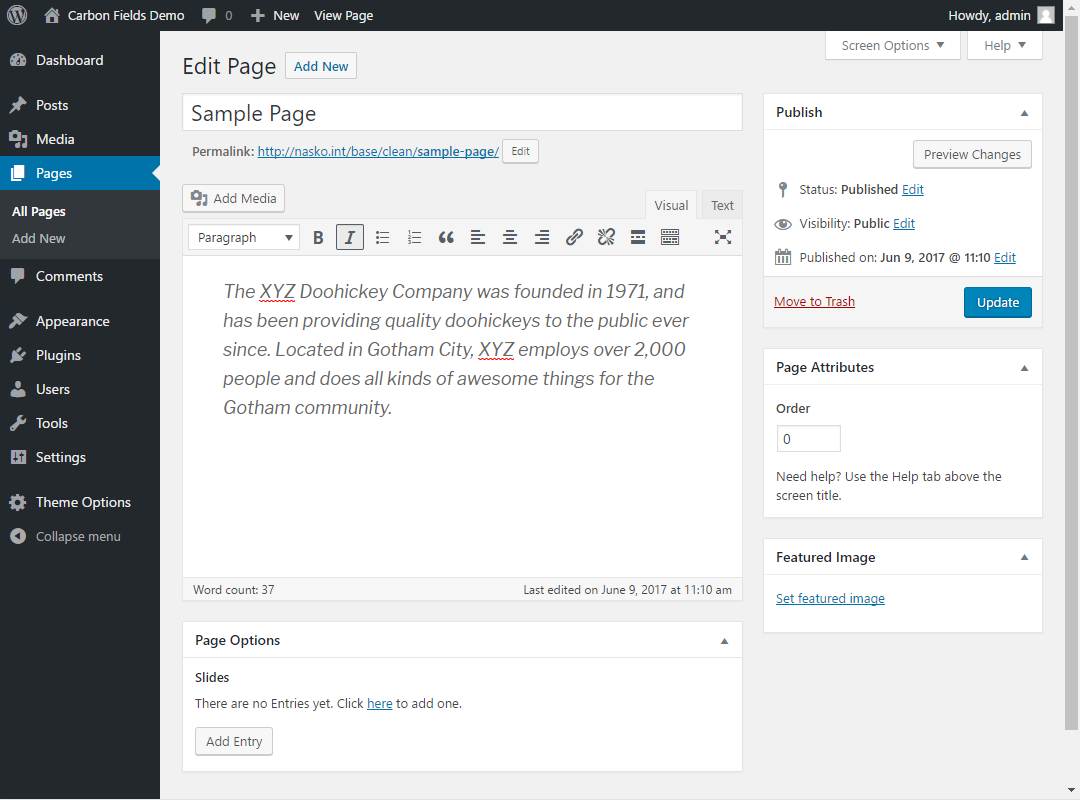
If you edit a page you will see the newly added "Slides" field:
We now have a repeating group that allows us to create any number of slides with an image, a title and a title color. Edit your desired page and create a few entries so we have something to list in our template like so:
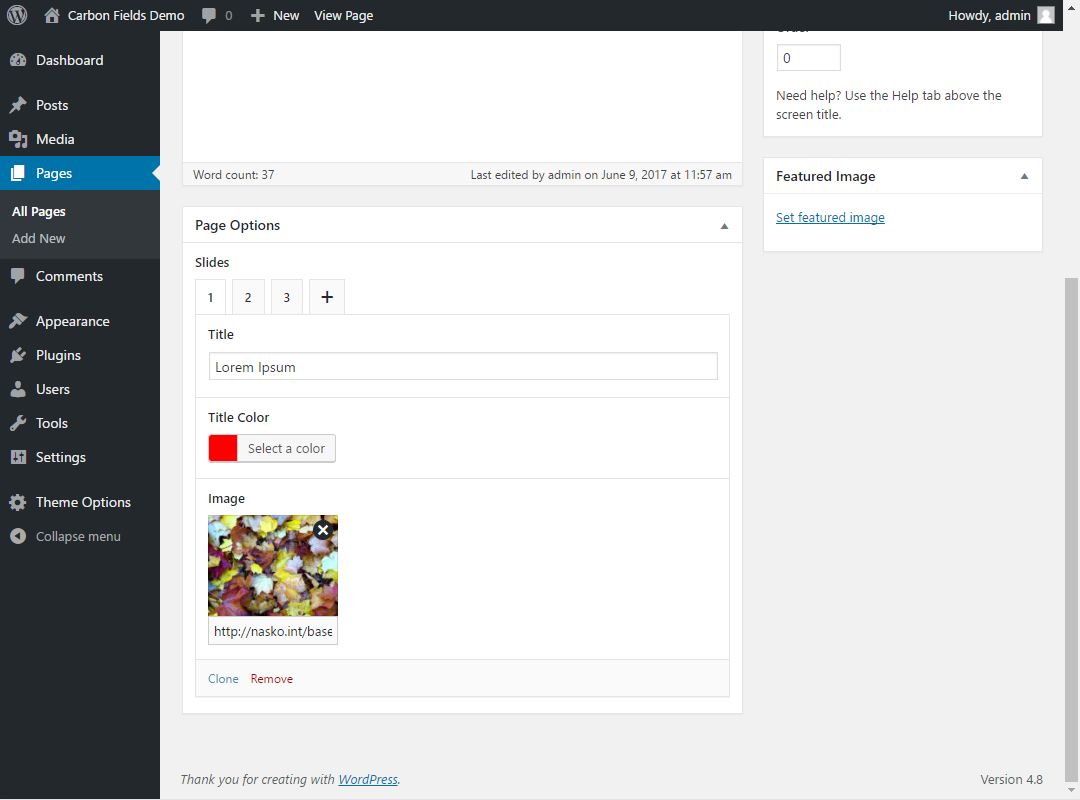
Once done, open up your page template (be it front-page.php or page.php) and add the following:
<?php
$slides = carbon_get_the_post_meta( 'crb_slides' );
echo '<ul>';
foreach ( $slides as $slide ) {
	echo '<li>';
	echo wp_get_attachment_image( $slide['image'] );
	echo '<h2 style="color: ' . $slide['color'] . '">' . $slide['title'] . '</h2>';
	echo '</li>';
}
echo '</ul>';
?>
Now our template will create a <ul> filled with images and titles suitable for use with your favorite slider JavaScript library!
Changing sidebar options
The following snippet allows you to change the default sidebar options for sidebars created through the Sidebar field.
functions.php
add_filter( 'carbon_fields_sidebar_options', 'my_custom_sidebar_options', 10, 2 );
function my_custom_sidebar_options( $sidebar_options, $sidebar_id ) {
    // see https://developer.wordpress.org/reference/functions/register_sidebar for more info on the available options
    $sidebar_options = array_merge( $sidebar_options, array(
        'before_widget' => '<li id="%1$s" class="widget %2$s">',
        'after_widget'  => '</li>',
        'before_title'  => '<h2 class="widgettitle">',
        'after_title'   => '</h2>',
    ) );
    return $sidebar_options;
}
Term meta
In this guide we'll add a "Color" field to categories and then display them in a color-coded list.
First, let's start with our container and field definitions in your theme's functions.php;
use Carbon_Fields\Field;
use Carbon_Fields\Container;

add_action( 'carbon_fields_register_fields', 'crb_attach_term_meta' );
function crb_attach_term_meta() {
    Container::make( 'term_meta', __( 'Term Options' ) )
        ->where( 'term_taxonomy', '=', 'category' ) // only show our new field for categories
        ->add_fields( array(
            Field::make( 'color', 'crb_color', 'Color' )
                ->set_required( true ),
        ) );
}
If you edit a category you will see the newly added "Color" field:
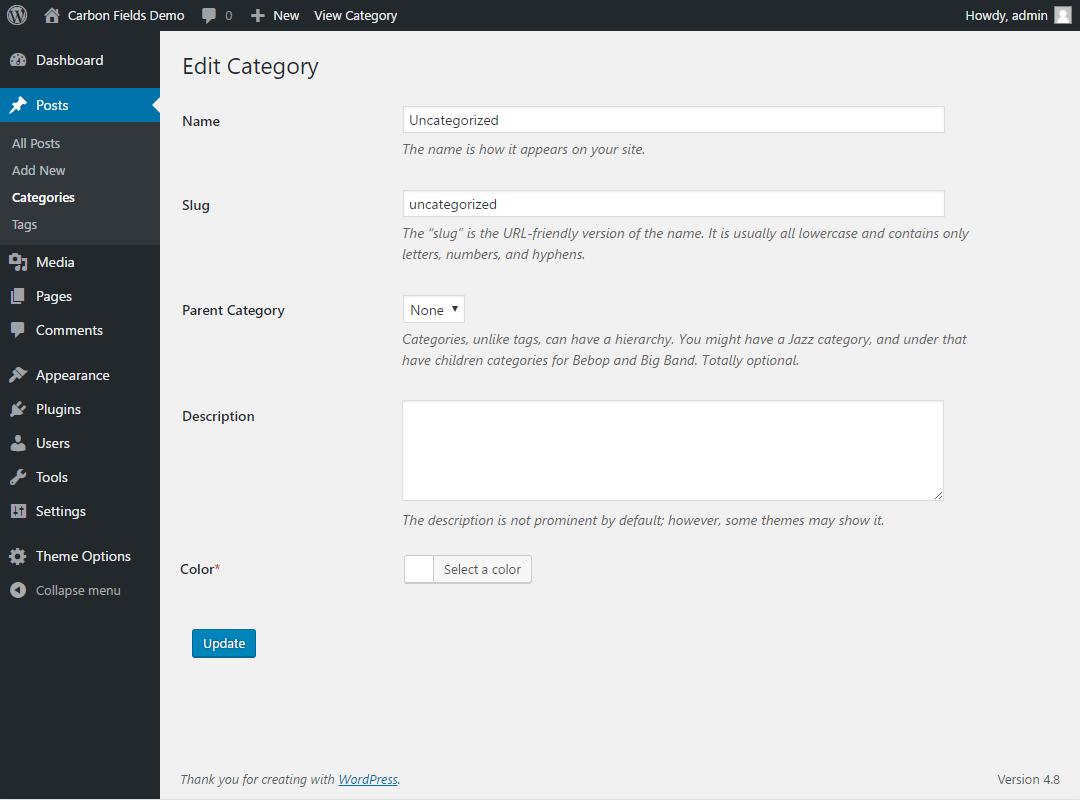
We now have a new color field available when creating or editing categories. Let's add some categories:
- "News" with the color #FF0000
- "Nature" with the color #00FF00
- "Technology" with the color #0000FF
Now let's list your categories in your footer.php file:
<?php
$categories = get_categories( 'hide_empty=0' );
echo '<ul>';
foreach ( $categories as $category ) {
    $color = carbon_get_term_meta( $category->term_id, 'crb_color' );
    echo '<li><a href="' . get_term_link( $category ) . '" style="color: ' . $color . ';">' . $category->name . '</a></li>';
}
echo '</ul>';
?>
Which results in:

Using field values
This guide will show how to get and output field values in your theme. The use-case we will be discussing is for a copyright rich text field that we'll display in the theme's footer.
!> NB: Field values can only be retrieved after the carbon_fields_fields_registered action has fired.
The carbon_fields_fields_registered action is called in the init action with a priority of 0.
First, we'll need to define our theme options container and the rich text field in it by adding the following snippet at the top of your functions.php file:
use Carbon_Fields\Field;
use Carbon_Fields\Container;

add_action( 'carbon_fields_register_fields', 'crb_attach_theme_options' );
function crb_attach_theme_options() {
    Container::make( 'theme_options', __( 'Theme Options' ) )
        ->add_fields( array(
            Field::make( 'rich_text', 'crb_footer_copyright', 'Copyright' ),
        ) );
}a
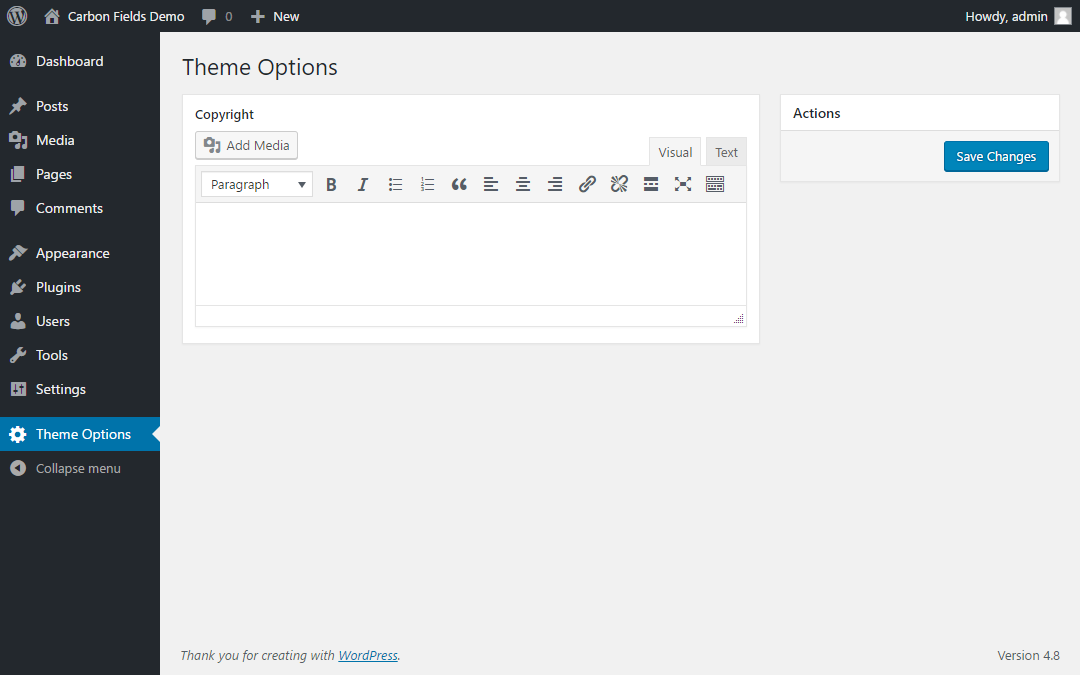
If you open your administration panel you will see the newly added "Theme Options" section:
Then, we'll have to edit the theme's footer.php and output the field value:
<?php
// get the field value
$copyright = carbon_get_theme_option( 'crb_footer_copyright' );

// output the field value
echo $copyright;
?>
Example 2: Post Meta
Here we'll create a field labeled "Venue" where authors can enter a place relevant to the post:
use Carbon_Fields\Field;
use Carbon_Fields\Container;

add_action( 'carbon_fields_register_fields', 'crb_attach_post_meta' );
function crb_attach_post_meta() {
    Container::make( 'post_meta', __( 'Post Options' ) )
        ->where( 'post_type', '=', 'post' )
        ->add_fields( array(
            Field::make( 'text', 'crb_venue', 'Venue' ),
        ) );
}
If you edit a post you will see the newly added "Post Options" meta box:
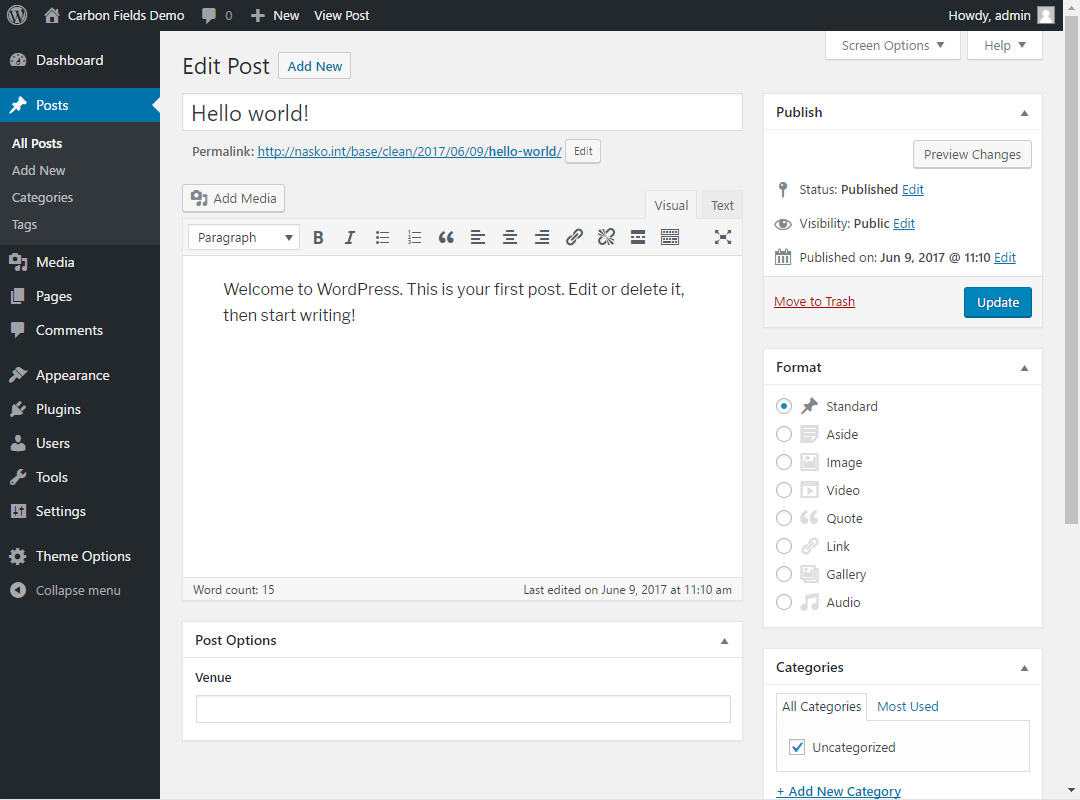
Then, we'll edit your Loop code like this (most likely found in index.php):
<?php while ( have_posts() ) : the_post(); ?>
	<p>Venue: <?php echo carbon_get_the_post_meta( 'crb_venue' ); ?></p>

	<!-- your usual WordPress Loop code here -->
<?php endwhile; ?>
Plugin Quickstart
There is a separate package which loads Carbon Fields as a WordPress plugin. Here's how to set it up:
-
Browse to your root WordPress directory
-
Execute the following in your terminal of choice:
composer require htmlburger/carbon-fields-plugin
- Add the following to the top of your functions.php file:
use Carbon_Fields\Container;
use Carbon_Fields\Field;

add_action( 'carbon_fields_register_fields', 'crb_attach_theme_options' );
function crb_attach_theme_options() {
    Container::make( 'theme_options', __( 'Theme Options' ) )
        ->add_fields( array(
            Field::make( 'text', 'crb_text', 'Text Field' ),
        ) );
}

add_action( 'after_setup_theme', 'crb_load' );
function crb_load() {
    require_once( ABSPATH . '/vendor/autoload.php' );
    \Carbon_Fields\Carbon_Fields::boot();
}
- Open up
/wp-admin/- you now have a brand new "Theme Options" admin section with a text field
If your composer.json is somewhere other than your WordPress root directory, you will have to add the following to it (replacing YOUR_DESIRED_LOCATION):
"extra": {
    "installer-paths": {
        "YOUR_DESIRED_LOCATION/vendor/{$vendor}/{$name}/": ["type:wordpress-plugin"]
    }
}
Without Composer
In case you do not wish to use composer to install Carbon Fields, you can also use one of our prebuilt zip packages:
-
Download https://carbonfields.net/zip/latest/ or visit https://carbonfields.net/release-archive/ and choose a download manually
-
Upload the .zip by using the "Upload Plugin" button on the
Plugins -> Add Newpage or unzip and upload it to yourplugins/directory -
Add the following to the top of your functions.php file:
use Carbon_Fields\Container;
use Carbon_Fields\Field;

add_action( 'carbon_fields_register_fields', 'crb_attach_theme_options' );
function crb_attach_theme_options() {
    Container::make( 'theme_options', __( 'Theme Options' ) )
        ->add_fields( array(
            Field::make( 'text', 'crb_text', 'Text Field' ),
        ) );
}
- Open up
/wp-admin/- you now have a brand new "Theme Options" admin section with a text field
Note: The zip packages use Composer's autoloader PHP classes, but do not require that you have composer installed.
Quickstart
This guide will show you how to install the Carbon Fields library using composer. To install Carbon Fields as a WordPress plugin, please follow the Plugin Quickstart guide instead.
- Browse to your theme directory.
- Execute the following in your terminal of choice:
composer require htmlburger/carbon-fields
- Add the following to the top of your functions.php file:
use Carbon_Fields\Container;
use Carbon_Fields\Field;

add_action( 'carbon_fields_register_fields', 'crb_attach_theme_options' );
function crb_attach_theme_options() {
    Container::make( 'theme_options', __( 'Theme Options' ) )
        ->add_fields( array(
            Field::make( 'text', 'crb_text', 'Text Field' ),
        ) );
}

add_action( 'after_setup_theme', 'crb_load' );
function crb_load() {
    require_once( 'vendor/autoload.php' );
    \Carbon_Fields\Carbon_Fields::boot();
}
- Open up
/wp-admin/- you now have a brand new "Theme Options" admin section with a text field
Support for Bedrock & similar frameworks
Carbon Fields has assets that need to be in your public directory in order to be loaded which can be problematic with Bedrock. To solve this we are going to use a composer installer package that allows you to override package installation directory on a per-package basis:
composer require mnsami/composer-custom-directory-installer- Add the following to your composer.json (replacing
YOUR_DESIRED_PUBLIC_LOCATION):"extra": { "installer-paths": { "YOUR_DESIRED_PUBLIC_LOCATION/vendor/{$vendor}/{$name}": ["htmlburger/carbon-fields"] } } composer require htmlburger/carbon-fields
Compacting input variables to fit within PHP's max_input_vars
In some cases forms can end up having hundreds of inputs which can cause the save request to exceed PHP's max_input_vars limit leading to lost request data. To combat this, Carbon Fields comes with a built-in support for input compacting which causes all inputs created by Carbon Fields to be sent as a single input var.
To enable input compacting please add the following near the top of your functions.php:
// Enables input var compacting
define( 'Carbon_Fields\\COMPACT_INPUT', true );

// Optionally overrides the compacted input name. You do not need this in most cases.
define( 'Carbon_Field\\COMPACT_INPUT_KEY', 'my_custom_compacted_input_name' );
Field Name Patterns
A Field Name Pattern is a string which is used as a way to refer to a specific field when using the PHP or JavaScript APIs (mainly when getting or setting a field's value).
Pattern schema
field_name[group_index]:group_type{/repeat}
Examples
In the following examples we'll show you several field definitions and the corresponding patterns to refer to them.
Field::make( 'text', 'crb_text' )
| Pattern | Refers to |
|---|---|
crb_text |
The crb_text field |
Field::make( 'complex', 'crb_services' )
    ->add_fields( array(
        Field::make( 'text', 'name' ),
    ) )
| Pattern | Refers to |
|---|---|
crb_services |
The crb_services field |
crb_services[0]/name |
The name field for the first crb_services group |
crb_services[1]/name |
The name field for the second crb_services group |
When you have custom groups defined you must specify the group name in the field pattern in order to resolve the correct fields (as different groups can have fields with identical names):
Field::make( 'complex', 'crb_services' )
    ->add_fields( 'digital', array(
        Field::make( 'text', 'name' ),
    ) )
    ->add_fields( 'physical', array(
        Field::make( 'textarea', 'name' ),
    ) )
| Pattern | Refers to |
|---|---|
crb_services |
The crb_services field |
crb_services[0]:digital/name |
The name field for the first crb_services group |
crb_services[1]:digital/name |
The name field for the second crb_services group |
Field::make( 'complex', 'crb_service_types' )
    ->add_fields( array(
        Field::make( 'text', 'name' ),
        Field::make( 'complex', 'services' )
            ->add_fields( array(
                Field::make( 'text', 'name' ),
            ) )
    ) )
| Pattern | Refers to |
|---|---|
crb_service_types |
The crb_service_types field |
crb_service_types[0]/name |
The name field for the first crb_service_types group |
crb_service_types[0]/services |
The services field for the first crb_service_types group |
crb_service_types[0]/services[0]/name |
The first name field for the first services group for the first crb_services_types group |
JavaScript API
Carbon Fields provide a useful JavaScript API on administration screens with visible containers which you can use to manipulate field values, for example.
Important: Carbon Fields use React + Redux which is why when setting a field's value you must ALWAYS use a "fresh" value rather than a reference to an old one. This is why the api exposes the immutable library (api.immutable - you can find example usage below).
Note: when referring to fields you use a Field Name Pattern - more information can be found in the Field Name Patterns documentation page.
API Methods
api.getFieldValue( fieldName )
Get a field's value.
api.setFieldValue( fieldName, value )
Set a field's value.
api.addComplexFieldGroup( fieldName[, groupName] )
Add a group to a complex field. groupName is optional when the field does not have defined group names.
api.removeComplexFieldGroup( fieldName, groupIndex )
Remove a group from a complex field by it's index.
API jQuery Events
'carbonFields.apiLoaded'
Triggered when the Carbon Fields' JS API is loaded.
| Parameter | Description |
|---|---|
event |
Event Object |
api |
API object which is used to communicate with Carbon Fields |
'carbonFields.fieldUpdated'
Triggered when a field's value changes.
| Parameter | Description |
|---|---|
event |
Event Object |
fieldName |
Name of the field that was updated |
'carbonFields.validateField'
Triggered when a field is being validated. This event actually behaves like a WordPress filter - you have to return a value. This enables you to define your own custom validation and error messages (an example can be found below).
| Parameter | Description |
|---|---|
event |
Event Object |
fieldName |
Name of the field that is being validated |
error |
The current error message for the field or null |
Examples
Getting the API object instance
$(document).on('carbonFields.apiLoaded', function(e, api) {
    // your api actions here
});
Getting a field's value
$(document).on('carbonFields.apiLoaded', function(e, api) {
    // Get the current value in the 'crb_text' field
    var value = api.getFieldValue( 'crb_text' );
});
Referring to fields inside complex fields
$(document).on('carbonFields.apiLoaded', function(e, api) {
    // Get the current value in the 'text' field
    // which is inside the first entry of the 'subcomplex' field
    // which is inside the first entry of the 'crb_complex' field
    var value = api.getFieldValue( 'crb_complex[0]/subcomplex[0]/text' );
});
Setting a field's value
$(document).on('carbonFields.apiLoaded', function(e, api) {
    // Set the current value of the 'crb_text' field to "Hello World"
    api.setFieldValue( 'crb_text', 'Hello World' );
});
Partially updating a field's value
In order to update fields that hold multiple value properties (e.g. Map has lat, lng, zoom and address) we must use the immutable library exposed by the API.
In the following example we only want to update the zoom property of the map to 5:
$(document).on('carbonFields.apiLoaded', function(e, api) {
    var value = api.getFieldValue( 'crb_map' );
    value = api.immutable.set( value, 'zoom', 5 );
    api.setFieldValue( 'crb_map', value );
});
Setting a complex field's value
$(document).on('carbonFields.apiLoaded', function(e, api) {
    // Set the current value of the 'crb_complex' field (which has a single "mytext" child field) to 2 entries
    api.setFieldValue( 'crb_complex', [
        {
            // _type => 'your_group_name_here', // optional: use only if you've specified group names on field definition
            mytext: 'Hello'
        },
        {
            // _type => 'your_group_name_here',
            mytext: 'World'
        }
    ] );
});
Detecting value changes
$(document).on('carbonFields.apiLoaded', function(e, api) {
    // Hook to all field changes and log the changed field's name and new value
    $(document).on('carbonFields.fieldUpdated', function(e, fieldName) {
        console.log('---');
        console.log('Field updated: ' + fieldName);
        console.log('New value:');
        console.log(api.getFieldValue(fieldName))
        console.log('---');
    });
});
Custom validation
NB! set_required() must be called for fields you wish to add custom validation to.
$(document).on('carbonFields.apiLoaded', function(e, api) {
    $(document).on('carbonFields.validateField', function(e, fieldName, error) {
        console.log('Field being validated: ' + fieldName);
        console.log('Current error, if any: ' + error);

        // Add your own validation logic here
        // To raise an error return any string which will serve as the user-friendly error message
        // To not raise an error return `null`
        // To not interfere with the built-in validation return the `error` variable argument

        // This example will raise an error if the field's value is not an even number
        // If the value is even, it will proceed with validation as usual
        if (fieldName === 'some_field_name_here') {
            var value = api.getFieldValue(fieldName);
            if ( parseInt( value ) % 2 !== 0 ) {
                return 'The entered value is not an even number';
            }
        }
        return error;
    });
});
JavaScript Hooks
To modify the behavior of existing fields, Carbon Fields exposes several hooks.
See @wordpress/hooks for more details about the usage of the hooks module.
Containers
carbon-fields.register-container-type
Used to filter the container settings. It receives the type of the container, the rendering context and the React component used to render the content as arguments.
carbon-fields.<type>.<context>
Used to modify the container's component. It receives the original Container component and returns a new wrapped component.
Note: The context can be classic or gutenberg.
Fields
carbon-fields.register-field-type
Used to filter the field settings. It receives the type of the field, the rendering context and the React component used to render the field as arguments.
carbon-fields.field-wrapper
Used to modify the field's wrapper component. It receives the original FieldWrapper component and returns a new wrapped component.
carbon-fields.field-wrapper.<context>
Same as carbon-fields.field-wrapper but for a specific context.
Note: The context can be metabox or block.
carbon-fields.field-edit
Used to modify the field’s edit component. It receives the original FieldEdit component and returns a new wrapped component.
carbon-fields.field-edit.<context>
Same as carbon-fields.field-edit but for a specific context.
Note: The context can be metabox or block.
carbon-fields.<type>.<context>
Same as carbon-fields.field-edit but for a specific field type and context.
Note: The context can be metabox or block.
carbon-fields.<type>.validate
Used to validate a required field. It receives the field and the value and returns a string that contains the validation error.
PHP Hooks
There are several hooks that allow you to include your custom classes and functionality at the right time, in the right place:
General
(action) carbon_fields_loaded
Called immediately after booting up Carbon Fields is done.
(action) carbon_fields_register_fields
Called prior to registering the Fields. This is the hook where you should register your fields.
(action) carbon_fields_fields_registered
Called after all Fields have been registered.
(action) carbon_fields_container_activated
Called after a Container has been activated.
(action) carbon_fields_{container_type}_container_saved
Called after a Container has been saved. Container type can be post_meta, term_meta, nav_menu_item etc.
(action) carbon_fields_field_activated
Called after a Field has been activated.
Container
(filter) carbon_fields_{container_type}_container_static_condition_types ( $condition_types )
Allows you to modify the allowed condition types for a specific container type. Useful if you extend Carbon Fields with a custom Condition as shown in the Extending section of this documentation.
- array<string>
$condition_typesArray of allowed condition types
(filter) carbon_fields_container_static_condition_types ( $condition_types )
Identical to the above, but affects all container types.
- array<string>
$condition_typesArray of allowed condition types
(filter) carbon_fields_container_is_valid_attach ( $is_valid, $container )
Allows you to have greater control over container display condition checking. For example, you can hook to this filter and add a custom if() check whether any container should be displayed to the user.
- boolean
$is_validDefines whether the save conditions are valid - Container
$containerThe container instance
(filter) carbon_fields_container_is_valid_save ( $is_valid, $container )
Allows you to have greater control over container save condition checking. For example, you can hook to this filter and add a custom if() check whether any container should save it's values on submission.
- boolean
$is_validDefines whether the save conditions are valid - Container
$containerThe container instance
Theme Options Container
(filter) carbon_fields_{container_title}_button_label ( $label )
Allows you to modify the button label of the theme options container. The filter name is based on the container's title. For example, the filter name for a container with a title of Theme Options would be carbon_fields_theme_options_button_label.
- string
$labelThe unfiltered button label.
(filter) carbon_fields_theme_options_container_admin_only_access ( $enable, $container_title, $container )
Allows you to override the default requirement for the manage_options capability in order to interact with this container.
Add the following to your functions.php to disable this filter entirely:
add_filter( 'carbon_fields_theme_options_container_admin_only_access', '__return_false' );
- boolean
$enableWhether to enable to disable this behavior. - string
$container_titleThe container title. - string
$containerThe container object.
User Meta Container
(filter) carbon_fields_user_meta_container_admin_only_access ( $enable, $container_title, $container )
Allows you to override the default requirement for the manage_options capability in order to interact with this container.
Add the following to your functions.php to disable this filter entirely:
add_filter( 'carbon_fields_user_meta_container_admin_only_access', '__return_false' );
- boolean
$enableWhether to enable to disable this behavior. - string
$container_titleThe container title. - string
$containerThe container object.
Field
(filter) carbon_fields_should_delete_field_value_on_save ( $delete, $field )
Allows you to modify whether fields delete their old value records before saving the new ones.
- boolean
$deleteDefines whether to delete the previous field value(s) - Field
$fieldThe field instance
(filter) carbon_fields_should_save_field_value ( $save, $value, $field )
Allows you to modify whether fields save their new value. For example, can be used to prevent fields from saving empty values.
- boolean
$saveDefines whether to save the new field value(s) - mixed
$valueThe new field value(s) - Field
$fieldThe field instance
Association Field
(filter) carbon_fields_association_field_title ( $title, $name, $id, $type, $subtype )
Allows you to modify the title of the association field items. Helpful when implementing custom association items. Passes the following parameters:
- string
$titleThe unfiltered item title. - string
$nameName of the association field. - int
$idThe database ID of the item. - string
$typeItem type (post, term, user, comment, or a custom one). - string
$subtypeSubtype –page,post,category, etc.
(filter) carbon_fields_association_field_item_label ( $label, $name, $id, $type, $subtype )
Allows you to modify the label of the association items. Helpful when implementing custom association items, or when you want to change the default label. Passes the following parameters:
- string
$labelThe unfiltered item label. - string
$nameName of the association field. - int
$idThe database ID of the item. - string
$typeItem type (post, term, user, comment, or a custom one). - string
$subtypeSubtype –page,post,category, etc.
(filter) carbon_fields_association_field_comment_length ( $number, $name )
Allows you to change the number of characters, visible from the comment text in an item. Passes the following parameters:
- int
$numberNumber of characters. Default:30 - string
$nameName of the association field.
(filter) carbon_fields_association_field_options_{name}_{type} ( $options )
(filter) carbon_fields_association_field_options_{name}_{type}_{subtype} ( $options )
Allows you to modify the available options of the association field with name {name} from the {type} type and of the {subtype} subtype where applicable.
- array
$optionsAn options array that will be passed to the underlying query instance.
-
if you want to filter the page post type options of the
crb_associationfield, you would use the following filter:carbon_fields_association_field_options_crb_association_post_page -
if you want to filter the category term options of the
crb_associationfield, you would use the following filter:carbon_fields_association_field_options_crb_association_term_category -
if you want to filter the users options of the
crb_associationfield, you would use the following filter:carbon_fields_association_field_options_crb_association_user -
if you want to filter the comments options of the
crb_associationfield, you would use the following filter:carbon_fields_association_field_options_crb_association_comment
(filter) carbon_fields_association_field_options ( $options, $name )
Allows you to filter the available options of a association field. Passes the following parameters:
- array
$optionsUnfiltered options. - string
$nameName of the association field.
Gravity Form Field
(filter) carbon_fields_gravity_form_options ( $options )
Allows you to modify the available GravityForms options.
- array
$optionsGravityForm options
Map Field
(filter) carbon_fields_map_field_api_key ( $api_key )
Allows you to set your own API key for Google Maps.
- string
$api_keyThe Google Maps API key
(filter) carbon_fields_map_field_api_url ( $api_url )
Allows you to completely replace the Google Maps JavaScript API URL.
- string
$api_urlThe Google Maps API URL
Sidebar Field
(filter) carbon_fields_sidebar_default_options ( $options )
Allows you to modify the default sidebar options for sidebars created through Carbon Fields.
- array
$optionsThe default sidebar options as provided toregister_sidebar()
(filter) carbon_fields_sidebar_options ( $options )
Allows you to modify the sidebar options for every sidebar created through Carbon Fields.
- array
$optionsThe sidebar options as provided toregister_sidebar()
Integrating with WP_Query
Carbon Fields allow you to make Post, Term and User queries based on fields even inside complex fields.
Example 1
Getting all posts which have a crb_text field with a value of 'hello world':
// field definition
Container::make( 'post_meta', __( 'Post Options' ) )
    ->where( 'post_type', '=', 'post' )
    ->add_fields( array(
        Field::make( 'text', 'crb_text', 'Text' ),
    ) );

// query
$query = new WP_Query( array(
    'post_type' => 'post',
    'meta_query' => array(
        array(
            'key' => 'crb_text',
            'value' => 'hello_world',
        ),
    ),
) );
Example 2
Getting all posts which have a crb_map field with a longitude property larger than -2 (rather than combined lat, lng value):
// field definition
Container::make( 'post_meta', __( 'Post Options' ) )
    ->where( 'post_type', '=', 'post' )
    ->add_fields( array(
        Field::make( 'map', 'crb_map', 'Map' ),
    ) );

// query
$query = new WP_Query( array(
    'post_type' => 'post',
    'meta_query' => array(
        array(
            'key' => 'crb_map',
            'carbon_field_property' => 'lng',
            'compare' => '>',
            'value' => -2,
        ),
    ),
) );
Example 3
Getting all posts which have 'red' selected in the crb_colors Set field:
// field definition
Container::make( 'post_meta', __( 'Post Options' ) )
    ->where( 'post_type', '=', 'post' )
    ->add_fields( array(
        Field::make( 'set', 'crb_colors', 'Colors' )
            ->add_options( array( 'red' => 'Red', 'green' => 'Green', 'blue' => 'Blue' ) ),
    ) );

// query
$query = new WP_Query( array(
    'post_type' => 'post',
    'meta_query' => array(
        array(
            'key' => 'crb_colors',
            'value' => 'red',
        ),
    ),
) );
Example 4
Getting all posts which have 'New York' entered in the city Text_Field inside a crb_cities complex field:
// field definition
Container::make( 'post_meta', __( 'Post Options' ) )
    ->where( 'post_type', '=', 'post' )
    ->add_fields( array(
        Field::make( 'complex', 'crb_cities', 'Cities' )
            ->add_fields( array(
                Field::make( 'text', 'city', 'City' ),
            ) )
    ) );

// query
$query = new WP_Query( array(
    'post_type' => 'post',
    'meta_query' => array(
        array(
            'key' => 'crb_cities/city',
            'value' => 'New York',
        ),
    ),
) );
Example 5
Getting all posts which have 'New York' entered in the city Text_Field inside a crb_cities complex field when the complex has multiple groups:
// field definition
Container::make( 'post_meta', __( 'Post Options' ) )
    ->where( 'post_type', '=', 'post' )
    ->add_fields( 'group1', array(
        Field::make( 'complex', 'crb_cities', 'Cities' )
            ->add_fields( array(
                Field::make( 'text', 'city', 'City' ),
            ) )
    ) )
    ->add_fields( 'group2', array(
        Field::make( 'complex', 'crb_cities', 'Cities' )
            ->add_fields( array(
                // ...
            ) )
    ) );

// query
$query = new WP_Query( array(
    'post_type' => 'post',
    'meta_query' => array(
        array(
            'key' => 'crb_cities:group1/city',
            'value' => 'New York',
        ),
    ),
) );
Example 6
Ordering posts based on a Carbon Field value:
// field definition
Container::make( 'post_meta', __( 'Post Options' ) )
    ->where( 'post_type', '=', 'post' )
    ->add_fields( array(
        Field::make( 'text', 'crb_text', 'Text' ),
    ) );

// query
$query = new WP_Query( array(
    'post_type' => 'post',
    'orderby' => 'text_field',
    'order' => 'asc',
    'meta_query' => array(
        'text_field' => array(
            'key' => 'crb_text',
            'compare' => 'EXISTS',
        ),
    ),
) );
Custom Datastore
The following example allows you to store theme options fields as a serialized array instead of multiple database rows.
It serves as a starting point if you need to switch the underlying data
Serialized_Theme_Options_Datastore.php
You first need to define a class that extends Carbon_Fields\Datastore\Datastore. You're required to define the following methods:
load( Field $field )- load field valuesave( Field $field )- create or update field valuedelete( Field $field )- delete the field from the datastore
<?php

use Carbon_Fields\Field\Field;
use Carbon_Fields\Datastore\Datastore;

/**
 * Stores serialized values in the database
 */
class Serialized_Theme_Options_Datastore extends Datastore {

    /**
     * Initialization tasks for concrete datastores.
     **/
    public function init() {

    }

    protected function get_key_for_field( Field $field ) {
        $key = '_' . $field->get_base_name();
        return $key;
    }

    /**
     * Save a single key-value pair to the database with autoload
     *
     * @param string $key
     * @param string $value
     * @param bool $autoload
     */
    protected function save_key_value_pair_with_autoload( $key, $value, $autoload ) {
        $notoptions = wp_cache_get( 'notoptions', 'options' );
        $notoptions[ $key ] = '';
        wp_cache_set( 'notoptions', $notoptions, 'options' );
        $autoload = $autoload ? 'yes' : 'no';

        if ( ! add_option( $key, $value, null, $autoload ) ) {
            update_option( $key, $value, $autoload );
        }
    }

    /**
     * Load the field value(s)
     *
     * @param Field $field The field to load value(s) in.
     * @return array
     */
    public function load( Field $field ) {
        $key = $this->get_key_for_field( $field );
        $value = get_option( $key, null );
        return $value;
    }

    /**
     * Save the field value(s)
     *
     * @param Field $field The field to save.
     */
    public function save( Field $field ) {
        if ( ! empty( $field->get_hierarchy() ) ) {
            return; // only applicable to root fields
        }
        $key = $this->get_key_for_field( $field );
        $value = $field->get_full_value();
        if ( is_a( $field, '\\Carbon_Fields\\Field\\Complex_Field' ) ) {
            $value = $field->get_value_tree();
        }
        $this->save_key_value_pair_with_autoload( $key, $value, $field->get_autoload() );
    }

    /**
     * Delete the field value(s)
     *
     * @param Field $field The field to delete.
     */
    public function delete( Field $field ) {
        if ( ! empty( $field->get_hierarchy() ) ) {
            return; // only applicable to root fields
        }
        $key = $this->get_key_for_field( $field );
        delete_option( $key );
    }
}
Container definitions
Every Field keeps an instance to an object implementing the Carbon_fields\Datastore\Datatore interface. When you define a field, you can setup that object via set_datastore method call like this:
Field::make( 'complex', 'crb_custom_datastore_complex' )
    ->set_datastore( new Serialized_Theme_Options_Datastore() )
    ->add_fields( array(
        Field::make( 'text', 'text' ),
    ) ),

Field::make( 'map', 'crb_custom_datastore_map' )
    ->set_datastore( new Serialized_Theme_Options_Datastore() ),
Programatically updating field values
Carbon Fields allow you to update field values programatically through the set of carbon_set_{container_type}( [$id,] $field_name, $value ) functions.
Note: when referring to fields you use a Field Name Pattern - more information can be found in the Field Name Patterns documentation page.
Example 1
Setting the value for the crb_text post_meta field for the post with id of 10:
// field definition
Container::make( 'post_meta', __( 'Post Options' ) )
    ->where( 'post_type', '=', 'post' )
    ->add_fields( array(
        Field::make( 'text', 'crb_text', 'Text' ),
    ) );

// updating
carbon_set_post_meta( 10, 'crb_text', 'Hello World!' );
Example 2
Setting the value for the text post_meta field for the post with id of 10 when the field is inside the crb_complex complex field:
// field definition
Container::make( 'post_meta', __( 'Post Options' ) )
    ->where( 'post_type', '=', 'post' )
    ->add_fields( array(
        Field::make( 'complex', 'crb_complex', 'Complex' )
            ->add_fields( array(
                Field::make( 'text', 'text', 'Text' ),
            ) ),
    ) );

// updating
carbon_set_post_meta( 10, 'crb_complex[0]/text', 'Hello World!' );
If we want to update the second crb_complex entry we can do the following (notice how the [index] part changes):
carbon_set_post_meta( 10, 'crb_complex[1]/text', 'Hello World!' );
Example 3
Setting the value for the crb_complex post_meta field for the post with id of 10 so it has 2 entries:
// field definition
Container::make( 'post_meta', __( 'Post Options' ) )
    ->where( 'post_type', '=', 'post' )
    ->add_fields( array(
        Field::make( 'complex', 'crb_complex', 'Complex' )
            ->add_fields( array(
                Field::make( 'text', 'text', 'Text' ),
            ) ),
    ) );

// updating
carbon_set_post_meta( 10, 'crb_complex', array(
    array(
        // _type => 'your_group_name_here', // optional: use only if you've specified group names on field definition
        'text' => 'Foo',
    ),
    array(
        // _type => 'your_group_name_here',
        'text' => 'Bar',
    ),
) );
WPML Support
Carbon Fields provide out-of-the-box support for WPML with the small exception of the Theme Options container (explained further below).
Flatpickr
Carbon Fields use Flatpickr for the Date, Time and Datetime fields. In order to translate these fields you must enqueue the relevant translation script for Flatpickr.
Here's an example on how to include Russian translations:
add_action( 'admin_enqueue_scripts', function() {
    wp_enqueue_script( 'flatpickr-locale-ru', 'https://npmcdn.com/flatpickr/dist/l10n/ru.js', array('carbon-fields-boot') );
} );
Carbon Fields will automatically detect your current administration language and pass it on to Flatpickr. If you want to override this behavior you can explicitly pass a locale for the relevant fields:
Field::make( 'date', ... )
    ->set_picker_options( array(
        'locale' => 'ru', // example with Russian
    ) ),
Theme Options
You can use this helpful snippet to achieve WPML-supporting theme options:
functions.php
function crb_get_i18n_suffix() {
    $suffix = '';
    if ( ! defined( 'ICL_LANGUAGE_CODE' ) ) {
        return $suffix;
    }
    $suffix = '_' . ICL_LANGUAGE_CODE;
    return $suffix;
}

function crb_get_i18n_theme_option( $option_name ) {
    $suffix = crb_get_i18n_suffix();
    return carbon_get_theme_option( $option_name . $suffix );
}
Field Definition
Container::make( 'theme_options', __( 'WPML Theme Options' ) )
    ->add_fields( array(
        Field::make( 'text', 'crb_wpml_text_field' . crb_get_i18n_suffix(), 'Text Field' )
    ) );
Getting values for the current language
var_dump( crb_get_i18n_theme_option( 'crb_wpml_text_field' ) );
Comment Meta
Comment meta containers add extra fields to the comment edit screens. Field data is stored separately for each comment as comment meta (see add_comment_meta).
use Carbon_Fields\Container;
use Carbon_Fields\Field;

Container::make( 'comment_meta', __( 'Comment Information' ) )
    ->add_fields( array(
        Field::make( 'text', 'crb_comment_rating', __( 'Comment Rating' ) ),
        Field::make( 'text', 'crb_comment_additional_info', __( 'Additional Comment Information' ) ),
    ) );
Accessing field values
To access field values you need to use the function carbon_get_comment_meta( $comment_id, $name ), where:
| Parameter | Description |
|---|---|
$comment_id |
Comment ID where your value was entered. |
$name |
The field name pattern of the field to be retrieved. |
<?php
$comments = get_comments( array(
    'post_id' => get_the_ID(),
) );

foreach ( $comments as $comment ) {
    $comment_additional_info = carbon_get_comment_meta( $comment->comment_ID, 'crb_comment_additional_info' );
    $comment_rating    = carbon_get_comment_meta( $comment->comment_ID, 'crb_comment_rating' );

    if ( ! empty( $comment_additional_info ) ) {
        echo $comment->comment_ID . ' info: ' . $comment_additional_info;
    }

    if ( ! empty( $comment_rating ) ) {
        echo 'Rating: ' . $comment_rating;
    }
}
?>
Condition Types
post_meta conditions
| Name | Description |
|---|---|
'post_format' |
Check against the post format. Use a blank string as the value to test if the post has no format assigned. |
'post_id' |
Check against the post id. |
'post_level' |
Check against the post level in the hierarchy. Levels start from 1. |
'post_parent_id' |
Check against the post's parent id. |
'post_ancestor_id' |
Check against the post's ancestors. |
'post_template' |
Check against the post's template filename. Pass default as the value to test against the default page template. |
'post_term' |
Check against the post's terms. The expected value must be a term descriptor (see below). CUSTOM callable is passed the post's id. |
'post_type' |
Check against the post's type. |
// Display container on Books CPT
Container::make( 'post_meta', __( 'Book Data' ) )
	->where( 'post_type', '=', 'crb_book' )
	->add_fields( array( .. ) );

// Display container on page that uses the template `templates/homepage.php`
Container::make( 'post_meta', __( 'Homepage Settings' ) )
	->where( 'post_type', '=', 'page' )
	->where( 'post_template', '=', 'templates/homepage.php' )
	->add_fields( array( .. ) );
term_meta conditions
| Name | Description |
|---|---|
'term' |
Check against the term according to the supplied term descriptor. CUSTOM callable is passed the term's id. |
'term_level' |
Check against the term's level in the hierarchy. |
'term_parent' |
Check against the term's parent. |
'term_ancestor' |
Check against the term's ancestors. |
'term_taxonomy' |
Check against the term's taxonomy. |
// Display container on Book Category taxonomy
Container::make( 'term_meta', __( 'Book Category Data' ) )
	->where( 'term_taxonomy', '=', 'crb_book_category' )
	->add_fields( array( .. ) );
user_meta conditions
| Name | Description |
|---|---|
'user_capability' |
Check against the user's capabilities. CUSTOM callable is passed the user's id. |
'user_id' |
Check against the user's id. |
'user_role' |
Check against the user's role. CUSTOM callable is passed an array of the user's roles. |
// Display container on for Administrators only
Container::make( 'user_meta', __( 'Administrator' ) )
	->where( 'user_role', '=', 'administrator' )
	->add_fields( array( .. ) );
theme_options conditions
| Name | Description |
|---|---|
'blog_id' |
Check against the current blog's id |
Generally available conditions
The below conditions are applicable to any container and depend on the current user
| Name | Description |
|---|---|
'current_user_capability' |
Check against the current user's capabilities. CUSTOM callable is passed the current user's id. |
'current_user_id' |
Check against the current user's id. |
'current_user_role' |
Check against the current user's role. CUSTOM callable is passed an array of all current user's roles. |
// Display theme options page to users who have the 'manage_options' capability
Container::make( 'theme_options', __( 'Theme Options' ) )
	->where( 'current_user_capability', '=', 'manage_options' )
	->add_fields( array( .. ) )
Term Descriptors
| Key | Description |
|---|---|
field |
The term field to compare with. |
value |
The value for the term field. |
taxonomy |
The taxonomy of the term. |
Example usage
Container::make( 'post_meta', 'Custom Data' )
    ->where( 'post_term', '=', array(
        'field' => 'slug',
        'value' => 'featured',
        'taxonomy' => 'category',
    ) )
More information on these values can be found in the documentation of the get_term_by() function in the WordPress Code Reference (the three keys here are identical to the first three arguments of this function).
Conditional Display
Containers are very flexible in terms of display options. By default, containers show on all related entities (all post types for post meta container, all terms for term meta container etc.), however, you can limit container visibility to specific post types, taxonomy terms, hierarchy levels and more with unlimited complexity.
Adding a display condition to a container is done by using one of the following methods:
->where( $condition, $comparison_operator, $value )- adds a condition with an AND relation to other conditions->or_where( $condition, $comparison_operator, $value )- adds a condition with an OR relation to other conditions
Note: chaining conditions behaves exactly like a normal php if statement with multiple conditions.
| Parameter | Description |
|---|---|
$condition |
A condition type name as a string (refer to the Condition Types page) |
$comparison_operator |
Can be one of the following: '=', '!=', '>', '>=', '<', '<=', 'IN', 'NOT IN', 'CUSTOM' |
$value |
The value to check against. IN and NOT IN operators expect an array; CUSTOM operator expects a callable |
Note: You can use an anonymous function as the $value parameter for all comparison operators in order to lazyload the value which can be very useful when evaluating the value is a resource-intensive task.
The CUSTOM comparison operator
This operator allows you to supply a callable which must return a boolean value whether this condition is fulfilled or not. This way you have more control over how a value is compared if the built-in functionality does not suit your needs.
For example, if you wish to have a container only display on pages on even levels in the hierarchy your code will look like this:
Container::make( 'post_meta', 'Custom Data' )
    ->where( 'post_type', '=', 'page' )
    ->where( 'post_level', 'CUSTOM', function( $post_level ) {
        return ( $post_level % 2 === 0 );
    } );
Examples
Showing a Post Meta Container on all pages
Container::make( 'post_meta', 'Custom Data' )
    ->where( 'post_type', '=', 'page' )
    ->add_fields( array( ... ) );
Showing a Post Meta Container on static home page
Container::make( 'post_meta', 'Custom Data' )
    ->where( 'post_id', '=', get_option( 'page_on_front' ) )
    ->add_fields( array( ... ) );
Showing a User Meta Container only if the current user is an administrator or editor
Container::make( 'post_meta', 'Custom Data' )
    ->where( 'current_user_role', 'IN', array( 'administrator', 'editor' ) )
    ->add_fields( array( ... ) );
Nested logic
In order to achieve nested display logic the where() and or_where() methods also support being invoked with a callable:
Container::make( 'post_meta', 'Custom Data' )
    ->where( function( $lvl1_condition ) {
        $lvl1_condition->where( $condition, $comparison_operator, $value );
        $lvl1_condition->where( function( $lvl2_condition ) {
            ... // can be nested infinitely
        } );
        ...
    } );
For example, to have a container visible on all post types if the current user is an administrator OR only on the page post type if the current user is an editor your code will look like this:
Container::make( 'post_meta', 'Custom Data' )
    ->where( 'current_user_role', '=', 'administrator' )
    ->or_where( function( $condition ) {
        $condition->where( 'current_user_role', '=', 'editor' );
        $condition->where( 'post_type', '=', 'page' );
    } );
Gutenberg Blocks
WordPress 5 introduces a new content creation experience with its new editor called Gutenberg.
Gutenberg is a block-based editor that provides a better and more natural way for creating new content on your website. With Carbon Fields v3 we got you covered and you can start creating stunning blocks for your website.
In order to create a new Gutenberg Block you can still use the already familiar developer-friendly way just like you'd register any other container.
<?php

use Carbon_Fields\Block;
use Carbon_Fields\Field;

Block::make( __( 'My Shiny Gutenberg Block' ) )
	->add_fields( array(
		Field::make( 'text', 'heading', __( 'Block Heading' ) ),
		Field::make( 'image', 'image', __( 'Block Image' ) ),
		Field::make( 'rich_text', 'content', __( 'Block Content' ) ),
	) )
	->set_render_callback( function ( $fields, $attributes, $inner_blocks ) {
		?>

		<div class="block">
			<div class="block__heading">
				<h1><?php echo esc_html( $fields['heading'] ); ?></h1>
			</div><!-- /.block__heading -->

			<div class="block__image">
				<?php echo wp_get_attachment_image( $fields['image'], 'full' ); ?>
			</div><!-- /.block__image -->

			<div class="block__content">
				<?php echo apply_filters( 'the_content', $fields['content'] ); ?>
			</div><!-- /.block__content -->
		</div><!-- /.block -->

		<?php
	} );
Notice the ->set_render_callback() method. This allows you to set the output that will be generated from this block both in Preview mode and on the frontend.
->set_render_callback() accepts a callback, which should output the HTML markup for the block. The callback function will be called with the following arguments:
$fields, an array with the entered data in the block.$attributes, an array with the attributes of the block like custom CSS class, alignment, etc.$inner_blocks, a string with the content of all nested blocks.
Config Methods
set_description( $description )
This method allows you to set a short text that describes the block. The description is shown in the Block inspector sidebar once you focus on the Block.
Block::make( __( 'My Shiny Gutenberg Block' ) )
	->add_fields( array(
		Field::make( 'text', 'heading', __( 'Block Heading' ) ),
		Field::make( 'image', 'image', __( 'Block Image' ) ),
		Field::make( 'rich_text', 'content', __( 'Block Content' ) ),
	) )
	->set_description( __( 'A simple block consisting of a heading, an image and a text content.' ) )
	->set_render_callback( function () {
		// ..
	} );
set_category( $slug, $title = null, $icon = null )
Gutenberg blocks can be grouped in different categories. By default, the following come registered out of the box:
- common
- formatting
- layout
- widgets
- embed
If you don't specify a category, the block will be assigned to common.
Block::make( __( 'My Shiny Gutenberg Block' ) )
	->add_fields( array(
		Field::make( 'text', 'heading', __( 'Block Heading' ) ),
		Field::make( 'image', 'image', __( 'Block Image' ) ),
		Field::make( 'rich_text', 'content', __( 'Block Content' ) ),
	) )
	->set_category( 'layout' )
	->set_render_callback( function () {
		// ..
	} );
However, if you need to, you can register a new category for your blocks.
Block::make( __( 'My Shiny Gutenberg Block' ) )
	->add_fields( array(
		Field::make( 'text', 'heading', __( 'Block Heading' ) ),
		Field::make( 'image', 'image', __( 'Block Image' ) ),
		Field::make( 'rich_text', 'content', __( 'Block Content' ) ),
	) )
	->set_category( 'custom-category', __( 'Custom Category' ), 'smiley' )
	->set_render_callback( function () {
		// ..
	} );
The $icon argument accepts the slug of a WordPress Dashicon
set_icon( $icon )
In addition to setting an icon to block categories, you can set an icon to the block itself.
Block::make( __( 'My Shiny Gutenberg Block' ) )
	->add_fields( array(
		Field::make( 'text', 'heading', __( 'Block Heading' ) ),
		Field::make( 'image', 'image', __( 'Block Image' ) ),
		Field::make( 'rich_text', 'content', __( 'Block Content' ) ),
	) )
	->set_icon( 'heart' )
	->set_render_callback( function () {
		// ..
	} );
set_keywords( $keywords = [] )
This method allows you to set the aliases that help users discover it while searching.
!> You are only allowed to add as much as 3 keywords per block.
Block::make( __( 'My Shiny Gutenberg Block' ) )
	->add_fields( array(
		Field::make( 'text', 'heading', __( 'Block Heading' ) ),
		Field::make( 'image', 'image', __( 'Block Image' ) ),
		Field::make( 'rich_text', 'content', __( 'Block Content' ) ),
	) )
	->set_keywords( [ __( 'block' ), __( 'image' ), __( 'content' ) ] )
	->set_render_callback( function () {
		// ..
	} );
set_mode( $mode = 'edit' )
This method sets the block mode to 'edit' or 'both'.
Block::make( __( 'My Shiny Gutenberg Block' ) )
	->add_fields( array(
		Field::make( 'text', 'heading', __( 'Block Heading' ) ),
		Field::make( 'image', 'image', __( 'Block Image' ) ),
		Field::make( 'rich_text', 'content', __( 'Block Content' ) ),
	) )
	->set_mode( 'edit' )
	->set_render_callback( function () {
		// ..
	} );
!> The nested blocks aren't affected by this method. Only their parent can enter in a preview mode.
set_editor_style( $handle )
You can set a custom stylesheet specific for your block, which will be loaded in the editor in the administration panel.
wp_register_style(
	'crb-my-shiny-gutenberg-block-stylesheet',
	get_stylesheet_directory_uri() . '/css/gutenberg/my-shiny-gutenberg-block.css'
);

Block::make( __( 'My Shiny Gutenberg Block' ) )
	->add_fields( array(
		Field::make( 'text', 'heading', __( 'Block Heading' ) ),
		Field::make( 'image', 'image', __( 'Block Image' ) ),
		Field::make( 'rich_text', 'content', __( 'Block Content' ) ),
	) )
	->set_editor_style( 'crb-my-shiny-gutenberg-block-stylesheet' )
	->set_render_callback( function () {
		// ..
	} );
set_style( $handle )
This method is the same as the set_editor_style, however, it will load the stylesheet on the frontend as well.
wp_register_style(
	'crb-my-shiny-gutenberg-block-stylesheet',
	get_stylesheet_directory_uri() . '/css/gutenberg/my-shiny-gutenberg-block.css'
);

Block::make( __( 'My Shiny Gutenberg Block' ) )
	->add_fields( array(
		Field::make( 'text', 'heading', __( 'Block Heading' ) ),
		Field::make( 'image', 'image', __( 'Block Image' ) ),
		Field::make( 'rich_text', 'content', __( 'Block Content' ) ),
	) )
	->set_style( 'crb-my-shiny-gutenberg-block-stylesheet' )
	->set_render_callback( function () {
		// ..
	} );
set_inner_blocks( $inner_blocks = true )
This method controls the ability of the block to contain nested blocks.
Block::make( __( 'My Shiny Gutenberg Block' ) )
	->add_fields( array(
		// ...
	) )
	->set_inner_blocks( true )
	->set_render_callback( function () {
		// ..
	} );
set_inner_blocks_position( $position = 'above' )
This method sets the position at which the inner blocks will render. The possible values are: above and below.
Block::make( __( 'My Shiny Gutenberg Block' ) )
	->add_fields( array(
		// ...
	) )
	->set_inner_blocks( true )
	->set_inner_blocks_position( 'below' )
	->set_render_callback( function () {
		// ..
	} );
set_inner_blocks_template( $template = null )
This method allows you to set a template of blocks which every new instance of your block will contain.
The possible values are: array and null.
See Gutenberg > Templates for more details.
Block::make( __( 'My Shiny Gutenberg Block' ) )
	->add_fields( array(
		// ...
	) )
	->set_inner_blocks( true )
	->set_inner_blocks_template( array(
		array( 'core/heading' ),
		array( 'core/paragraph' )
	) )
	->set_render_callback( function () {
		// ..
	} );
set_inner_blocks_template_lock( $lock = null )
This method allows you to lock the area that contains the nested blocks. The possible values are:
all- prevents all operations. It is not possible to insert new blocks. Move existing blocks or delete them.insert- prevents inserting or removing blocks, but allows moving existing ones.false- prevents locking from being applied to the nested blocks area even if a parent block contains locking.null- disables any locks applied to the area.
See Gutenberg > Templates and Gutenberg > Inner Blocks for more details.
Block::make( __( 'My Shiny Gutenberg Block' ) )
	->add_fields( array(
		// ...
	) )
	->set_inner_blocks( true )
	->set_inner_blocks_template( array(
		array( 'core/heading' ),
		array( 'core/paragraph' )
	) )
	->set_inner_blocks_template_lock( 'insert' )
	->set_render_callback( function () {
		// ..
	} );
set_parent( $parent = null )
This method allows you to restrict the block to be inserted to specific block types.
The possible values are - string, array or null.
See Gutenberg > Block Registration for more details.
Block::make( __( 'Product' ) )
	->add_fields( array(
		// ...
	) )
	->set_inner_blocks( true )
	->set_render_callback( function () {
		// ..
	} );

Block::make( __( 'Product Description' ) )
	->add_fields( array(
		// ...
	) )
	->set_parent( 'carbon-fields/product' )
	->set_render_callback( function () {
		// ..
	} );
set_allowed_inner_blocks( $blocks = null )
This method allows you to restrict the type of blocks that can be inserted in the nested blocks area.
The possible values are - array or null.
See Gutenberg > Inner Blocks for more details.
!> If an empty array is passed then only the blocks that have your block as parent can be inserted. See the set_parent method.
Block::make( __( 'My Shiny Gutenberg Block' ) )
	->add_fields( array(
		// ...
	) )
	->set_inner_blocks( true )
	->set_allowed_inner_blocks( array(
		'core/paragraph',
		'core/list'
	) )
	->set_render_callback( function () {
		// ..
	} );
Nav Menu Item
use Carbon_Fields\Container;
use Carbon_Fields\Field;

Container::make( 'nav_menu_item', __( 'Menu Settings' ) )
    ->add_fields( array(
        Field::make( 'color', 'crb_color', __( 'Color' ) ),
    ));
Container position
Containers are rendered in the order they are initialized.
Accessing field values
| Parameter | Description |
|---|---|
$nav_menu_item_ID |
Nav Menu Item Post ID where your value was entered. |
$name |
The field name pattern of the field to be retrieved. |
Custom Walkers or Walker Filters
In order to use the values setup from Nav Menus, you need to use a custom Menu Walker or a filter from the default walker located in wp-includes/nav-menu-template.php.
Here is a Walker example:
/**
 * Location:
 *     wp-includes/nav-menu-template.php
 *     source: Walker_Nav_Menu
 */
class Crb_Main_Menu_Walker extends Walker_Nav_Menu {
    public function start_el( &$output, $item, $depth = 0, $args = array(), $id = 0 ) {
        $indent = ( $depth ) ? str_repeat( "\t", $depth ) : '';

        $classes = empty( $item->classes ) ? array() : (array) $item->classes;
        $classes[] = 'menu-item-' . $item->ID;

        $class_names = join( ' ', apply_filters( 'nav_menu_css_class', array_filter( $classes ), $item, $args, $depth ) );
        $class_names = $class_names ? ' class="' . esc_attr( $class_names ) . '"' : '';

        $id = apply_filters( 'nav_menu_item_id', 'menu-item-'. $item->ID, $item, $args, $depth );
        $id = $id ? ' id="' . esc_attr( $id ) . '"' : '';

        $output .= $indent . '<li' . $id . $class_names .'>';

        $atts = array();
        $atts['title']  = ! empty( $item->attr_title ) ? $item->attr_title : '';
        $atts['target'] = ! empty( $item->target )     ? $item->target     : '';
        $atts['rel']    = ! empty( $item->xfn )        ? $item->xfn        : '';
        $atts['href']   = ! empty( $item->url )        ? $item->url        : '';


        // Adding a custom color to the links
        $crb_color = carbon_get_nav_menu_item_meta( $item->ID, 'crb_color' );
        $atts['style'] = ! empty( $crb_color ) ? 'color: ' . $crb_color . '; ' : '';
        // --- END --- "Adding a custom color to the links"

        $atts = apply_filters( 'nav_menu_link_attributes', $atts, $item, $args, $depth );

        $attributes = '';
        foreach ( $atts as $attr => $value ) {
            if ( ! empty( $value ) ) {
                $value = ( 'href' === $attr ) ? esc_url( $value ) : esc_attr( $value );
                $attributes .= ' ' . $attr . '="' . $value . '"';
            }
        }

        $item_output = $args->before;
        $item_output .= '<a'. $attributes .'>';

        $item_output .= $args->link_before . apply_filters( 'the_title', $item->title, $item->ID ) . $args->link_after;
        $item_output .= '';
        $item_output .= $args->after;

        $output .= apply_filters( 'walker_nav_menu_start_el', $item_output, $item, $depth, $args );
    }

} // Walker_Nav_Menu
Here is a Filter example, doing the same thing:
// Adding a custom color to the links
add_filter( 'nav_menu_link_attributes', 'crb_nav_menu_link_attributes', 10, 4 );
function crb_nav_menu_link_attributes( $atts, $item, $args, $depth ) {
    $crb_color = carbon_get_nav_menu_item_meta( $item->ID, 'crb_color' );
    $atts['style'] = ! empty( $crb_color ) ? 'color: ' . $crb_color . '; ' : '';

    return $atts;
}
Both of the above examples will result in:
<div class="menu-main-menu-container">
    <ul id="menu-main-menu" class="menu">
        <li id="menu-item-23" class="menu-item menu-item-type-post_type menu-item-object-page menu-item-23">
            <a href="#" style="color: #2020f3;">Sample Page</a>
        </li>
        <li id="menu-item-24" class="menu-item menu-item-type-post_type menu-item-object-page menu-item-24">
            <a href="#" style="color: #f94c4c;">Sample Page</a>
        </li>
        <li id="menu-item-26" class="menu-item menu-item-type-post_type menu-item-object-page menu-item-26">
            <a href="#" style="color: #81d742;">Sample Page</a>
        </li>
    </ul>
</div>
Network
Network containers are used to add pages with options in the Multisite network administration only. Field data is stored as site meta.
Since the Network container extends the Theme Options container, please refer to the Theme Options container documentation for more information.
Example Container
use Carbon_Fields\Container;
use Carbon_Fields\Field;

Container::make( 'network', 'crb_network_container', 'Network Settings' )
  ->add_fields( array(
    Field::make( 'text', 'crb_title' ) ,
    Field::make( 'checkbox', 'crb_disable_feature' )
  )
);
Accessing field values
To retrieve field values from a network options container, you need to use the function carbon_get_network_option( $site_id, $name, $container_id ), where:
| Parameter | Description |
|---|---|
$site_id |
The site ID of the current network (example: SITE_ID_CURRENT_SITE) |
$name |
The field name pattern of the field to be retrieved. |
$container_id |
The container ID that contains the field. In the example above, crb_network_container. |
<h1>This is my title: <?php echo carbon_get_network_option( SITE_ID_CURRENT_SITE, 'crb_title', 'carbon_fields_container_crb_network_container' ); ?></p>
After saving, the carbon_fields_network_container_saved hook is called, which allows you to hook additional functionality after saving.
Post Meta
Custom Field containers are used to extend the post edit screens with additional fields. Field data is stored separately for each post as post meta (see add_post_meta).
Container position
More information about the position options can be found in the add_meta_box() function.
Context
The part of the page where the container should be shown ('normal' (default), 'advanced', 'side' or 'carbon_fields_after_title')
->set_context( 'normal' )
Priority
The priority within the context where the container should show ('high' (default), 'core', 'default' or 'low')
->set_priority( 'high' )
Accessing field values
To access field values you need to use the function carbon_get_post_meta( $id, $name ), where:
| Parameter | Description |
|---|---|
$id |
Post ID where your value was entered. |
$name |
The field name pattern of the field to be retrieved. |
<!-- Simple field -->
<p>Article was published in: <?php echo carbon_get_post_meta( get_the_ID(), 'crb_location' ); ?></p>

<!-- Complex field -->
<?php
$slides = carbon_get_post_meta( get_the_ID(), 'crb_slides' );
if ( $slides ) {
    foreach ( $slides as $slide ) {
        echo $slide['image'];
    }
}
?>
You can also use carbon_get_the_post_meta( $name ) to access the values for the current post in The Loop.
<p>Article was published in: <?php echo carbon_get_the_post_meta( 'crb_location' ); ?></p>

<?php $slides = carbon_get_the_post_meta( 'crb_slides' ); ?>
After saving, the carbon_fields_post_meta_container_saved hook is called, which allows you to hook additional functionality after saving. It accepts the $post_id parameter, which is the ID of the post being updated. Example:
add_action( 'carbon_fields_post_meta_container_saved', 'crb_after_save_event' );
function crb_after_save_event( $post_id ) {
    if ( get_post_type( $post_id ) !== 'crb_event' ) {
        return false;
    }

    $event_date = carbon_get_post_meta( $post_id, 'crb_event_date' );
    if ( $event_date ) {
        $timestamp = strtotime( $event_date );
        update_post_meta( $post_id, '_crb_event_timestamp', $timestamp );
    }
}
Tabs
The tabs allow you to group multiple fields under different tab panels using the Container method add_tab().
Tabs can be used on every container type. Example:
use Carbon_Fields\Container;
use Carbon_Fields\Field;

Container::make( 'post_meta', __( 'User Settings' ) )
    ->where( 'post_type', '=', 'page' )
    ->add_tab( __( 'Profile' ), array(
        Field::make( 'text', 'crb_first_name', __( 'First Name' ) ),
        Field::make( 'text', 'crb_last_name', __( 'Last Name' ) ),
        Field::make( 'text', 'crb_position', __( 'Position' ) ),
    ) )
    ->add_tab( __( 'Notification' ), array(
        Field::make( 'text', 'crb_email', __( 'Notification Email' ) ),
        Field::make( 'text', 'crb_phone', __( 'Phone Number' ) ),
    ) );
Term Meta
Term meta containers are used to extend the term edit screens with additional fields. Field data is stored separately for each term, using the default term meta functionality for WordPress 4.4 and higher. For WordPress versions prior to 4.4, data is stored in a custom table ($wpdb->termmeta).
use Carbon_Fields\Container;
use Carbon_Fields\Field;

Container::make( 'term_meta', __( 'Category Properties' ) )
    ->where( 'term_taxonomy', '=', 'category' )
    ->add_fields( array(
        Field::make( 'color', 'crb_title_color', __( 'Title Color' ) ),
        Field::make( 'image', 'crb_thumb', __( 'Thumbnail' ) ),
    ) );
Accessing field values
To access field values you need to use the function carbon_get_term_meta( $term_id, $name ), where:
| Parameter | Description |
|---|---|
$term_id |
Term ID where your value was entered. |
$name |
The field name pattern of the field to be retrieved. |
<!-- Simple field -->
<p>Editor of this category: <?php echo carbon_get_term_meta( $category->term_id, 'crb_editor' ); ?></p>

<!-- Complex field -->
<?php
$authors = carbon_get_term_meta( $category->term_id, 'crb_authors' );
foreach ( $authors as $author ) {
    echo $author['name'];
}
?>
After saving, the carbon_fields_term_meta_container_saved hook is called, which allows you to hook additional functionality after saving. It accepts the $term_id parameter, which is the term_id of the taxonomy term that was updated.
Theme Options
Theme option containers are used to add pages with options in the back-end. Field data is stored as options.
Note that by default only users with the manage_options capability have access to this container. In order to override this behavior please refer to the carbon_fields_theme_options_container_admin_only_access filter in the Hooks section.
By default, theme options containers automatically create main page in the admin area menu named “Theme Options”. In most cases these default settings are sufficient, but if you need to change the title or the location of a page in the menu, read the “Multiple option pages” section below.
use Carbon_Fields\Container;
use Carbon_Fields\Field;

Container::make( 'theme_options', __( 'Theme Options' ) )
    ->add_fields( array(
        Field::make( 'text', 'crb_facebook_url', __( 'Facebook URL' ) ),
        Field::make( 'textarea', 'crb_footer_text', __( 'Footer Text' ) )
    ) );
Multiple option pages
It is sometimes needed to create more than one option page. At other times you need to place different pages in different sections in the admin menu. For example, you might have extensive list of settings for the background that you would want to place on a separate Theme options page under Appearance.
To change the location of your Theme Options page, you use set_page_parent( $parent ), where $parent is either:
- A reference to a top level Theme Options container.
- The menu slug of a top level Theme Options container.
- The menu slug of any top level adminsitration page. This corresponds to the
$parent_slugparameter of add_submenu_page(). You can see all predefined page parents here.
Below you see sample code for creating three theme option containers:
use Carbon_Fields\Container;
use Carbon_Fields\Field;

// Default options page
$basic_options_container = Container::make( 'theme_options', __( 'Basic Options' ) )
    ->add_fields( array(
        Field::make( 'header_scripts', 'crb_header_script', __( 'Header Script' ) ),
        Field::make( 'footer_scripts', 'crb_footer_script', __( 'Footer Script' ) ),
    ) );

// Add second options page under 'Basic Options'
Container::make( 'theme_options', __( 'Social Links' ) )
    ->set_page_parent( $basic_options_container ) // reference to a top level container
    ->add_fields( array(
        Field::make( 'text', 'crb_facebook_link', __( 'Facebook Link' ) ),
        Field::make( 'text', 'crb_twitter_link', __( 'Twitter Link' ) ),
    ) );

// Add third options page under "Appearance"
Container::make( 'theme_options', __( 'Customize Background' ) )
    ->set_page_parent( 'themes.php' ) // identificator of the "Appearance" admin section
    ->add_fields( array(
        Field::make( 'color', 'crb_background_color', __( 'Background Color' ) ),
        Field::make( 'image', 'crb_background_image', __( 'Background Image' ) ),
    ) );
For detailed information on managing admin pages, see Administration_Menus.
Localizing the page title
By default, the URL of the option page is generated from the title passed to the Container::make method. In the example above, the URL will be admin.php?page=theme-options. If you use a gettext function to localize the title, for example:
Container::make( 'theme_options', __( 'Theme Options', 'my-textdomain' ) )
then the URL of your page will be different for different languages. This will cause issues with multilingual plugins, such as WPGlobus or WPML, that allow for admin language switching.
To resolve this, you need to call the set_page_file method, like this:
use Carbon_Fields\Container;
use Carbon_Fields\Field;

Container::make( 'theme_options', __( 'Theme Options', 'my-textdomain' ) )
    ->set_page_file( 'theme-options' )
    ->add_fields( array(
        Field::make( 'text', 'crb_facebook_url' ),
        Field::make( 'textarea', 'crb_footer_text' ),
    ) );
Menu icon
To change the icon of your Theme Options page, you can use set_icon( $icon ), where $icon can be one of the values, supported in the $icon_url parameter of the add_menu_page() function.
Below you see an example for setting up the icon of the theme options page:
use Carbon_Fields\Container;
use Carbon_Fields\Field;

Container::make( 'theme_options', 'Basic Options' )
    ->set_icon( 'dashicons-carrot' )
    ->add_fields( array(
        Field::make( 'text', 'crb_test_field' ),
    ) );
Menu title
Container::make( 'theme_options', 'A very long option page title' )
    ->set_page_menu_title( 'Custom Options' )
    ->add_fields( array(
        // ...
    ) );
Menu position
To change the position priority of the page's menu button, you use set_page_menu_position( $position ), where $position is a number. For more information see the add_menu_page() function.
Container::make( 'theme_options', 'Basic Options' )
    ->set_page_menu_position( 80 )
    ->add_fields( array(
        // ...
    ) );
NB! You can specify custom icons only to parent theme options pages.
Accessing field values
To retrieve field values from a theme options container, you need to use the function carbon_get_theme_option( $name ), where:
| Parameter | Description |
|---|---|
$name |
The field name pattern of the field to be retrieved. |
<p>Copyright <?php echo carbon_get_theme_option( 'crb_copyright' ); ?></p>
<p>
    Office locations:
    <?php
    $address_lines = carbon_get_theme_option( 'crb_addresses' );
    foreach ( $address_lines as $line ) {
        echo $line . '<br/>';
    }
    ?>
<p>
After saving, the carbon_fields_theme_options_container_saved hook is called, which allows you to hook additional functionality after saving.
Usage
A Container is a group of custom fields and display options. Containers are displayed on different parts of the backend, according to their type and display options.
By default, all containers are visible on all entities based on their type (posts for post_meta, terms for term_meta etc.) and are editable by all users who can access the related edit screen.
To create a new container you must specify a type and a title:
use Carbon_Fields\Container;
use Carbon_Fields\Field;

Container::make( 'post_meta', 'Custom Data' )
    ->where( 'post_type', '=', 'page' )
    ->add_fields( array(
        Field::make( 'map', 'crb_location' )
            ->set_position( 37.423156, -122.084917, 14 ),
        Field::make( 'sidebar', 'crb_custom_sidebar' ),
        Field::make( 'image', 'crb_photo' ),
    ));
To create a new Container, you just use the Container::make( $type, $title ) method, where:
| Parameter | Description |
|---|---|
$type |
Identifier of the container type (accepted values are post_meta, term_meta, user_meta, comment_meta, nav_menu_item and theme_options). |
$title |
Title of the container. |
Alternatively, you can pass an id for the container using Container::make( $type, $id, $title ), where:
| Parameter | Description |
|---|---|
$type |
Identifier of the container type (accepted values are post_meta, term_meta, user_meta, comment_meta, nav_menu_item and theme_options). |
$id |
Unique id of the container. Automatically prefixed with carbon_fields_container_ |
$title |
Title of the container. |
User Meta
User meta containers add extra fields to the user edit screens. Field data is stored separately for each user as user meta (see add_user_meta).
Note that by default only users with the manage_options capability have access to this container. In order to override this behavior please refer to the carbon_fields_user_meta_container_admin_only_access filter in the Hooks section.
use Carbon_Fields\Container;
use Carbon_Fields\Field;

Container::make( 'user_meta', 'Address' )
    ->add_fields( array(
        Field::make( 'text', 'crb_city_and_post', 'City and post code' ),
        Field::make( 'text', 'crb_street', 'Street Name' ),
    ) );
Accessing field values
To access field values you need to use the function carbon_get_user_meta( $user_d, $name ), where:
| Parameter | Description |
|---|---|
$user_id |
User ID where your value was entered. |
$name |
The field name pattern of the field to be retrieved. |
<!-- Simple field -->
<p>Author address: <?php echo carbon_get_user_meta( get_the_author_meta( 'ID' ), 'crb_street' ); ?></p>

<!-- Complex field -->
<?php
$phone_numbers = carbon_get_user_meta( get_the_author_meta( 'ID' ), 'crb_phone_numbers' );
foreach ( $phone_numbers as $phone ) {
    echo $phone['country_code'] . '-' . $phone['number'];
}
?>
After saving, the carbon_fields_user_meta_container_saved hook is called, which allows you to hook additional functionality after saving. It accepts the $user_id parameter, which is the ID of the user that was updated.
Widgets
The Widget container is used to create custom widgets for your theme. Each widget is defined as a PHP class which:
- extends the
\Carbon_Fields\Widgetclass (reference) - defines the constructor
__construct()andfront_end()methods
The constructor must call the method setup( $widget_id, $title, $description, $fields, $classname = '' ), where:
| Parameter | Description |
|---|---|
$widget_id |
ID of the widget. Note that it will automatically be prepended with 'carbon_fields_' |
$title |
Title of the widget, used in the back-end |
$description |
Description of the widget, used in the back-end |
$fields |
Array of fields |
$classname (optional) |
Provide a custom class attribute for the widget. |
The front_end( $args, $instance ) method is responsible for rendering your widget in the front-end. Here you have access to all values saved for the fields you defined in the constructor via the $instance parameter.
After you define your class, it is important that you register your new widget during the widgets_init action.
use Carbon_Fields\Widget;
use Carbon_Fields\Field;

class ThemeWidgetExample extends Widget {
    // Register widget function. Must have the same name as the class
    function __construct() {
        $this->setup( 'theme_widget_example', 'Theme Widget - Example', 'Displays a block with title/text', array(
            Field::make( 'text', 'title', 'Title' )->set_default_value( 'Hello World!') ,
            Field::make( 'textarea', 'content', 'Content' )->set_default_value( 'Lorem Ipsum dolor sit amet' )
        ) );
    }

    // Called when rendering the widget in the front-end
    function front_end( $args, $instance ) {
        echo $args['before_title'] . $instance['title'] . $args['after_title'];
        echo '<p>' . $instance['content'] . '</p>';
    }
}

function load_widgets() {
    register_widget( 'ThemeWidgetExample' );
}
And you should add the following hook to your theme functions.php:
add_action( 'widgets_init', 'load_widgets' );
You can setup control options (like width) of your widget by adding a $form_options definition at beginning of your custom widget class. Example:
protected $form_options = array(
    'width' => 500
);
In case you want to disable the default widget wrappers that come from your sidebar, you can disable $this->print_wrappers in the __construct() method of your widget. Example:
function __construct() {
    $this->setup( 'widget_id', 'Widget Title', __('Widget Description'), array(
        Field::make( 'text', 'title', 'Title' )->set_default_value( 'Hello World!' ),
    ) );

    $this->print_wrappers = false;
}
Container Conditions
Carbon Fields allows you to define your own container conditions as well. Here's how to define and use a "Foobar_Condition" class for theme options containers:
Foobar_Condition.php
class Foobar_Condition extends Condition {

    /**
     * Check if the condition is fulfilled
     *
     * @param  array $environment
     * @return bool
     */
    public function is_fulfilled( $environment ) {
        return $this->compare(
            'foobar', // Only return true when the passed value is 'foobar'
            $this->get_comparison_operator(),
            $this->get_value()
        );
    }
}
functions.php or another suitable place
\Carbon_Fields\Carbon_Fields::extend( Foobar_Condition::class, function( $container ) {
    // create an instance of our new class
    $condition = new Foobar_Condition();
    $condition->set_comparers( \Carbon_Fields\Carbon_Fields::resolve( 'generic', 'container_condition_comparer_collections' ) );
    return $condition;
} );

add_filter( 'carbon_fields_theme_options_container_static_condition_types', function( $condition_types, $container_type, $container ) {
    // append our new condition type to allowed theme options conditions
    return array_merge(
        $condition_types,
        array( 'foobar' )
    );
}, 10, 3 );
Container definitions
Container::make( 'theme_options', __( 'Foobar Container' ) )
    ->where( 'foobar', '=', 'foobar' ); // this will always return true
    // ->where( 'foobar', '=', 'lorem' ); // this will always return false
Creating Custom Field
Creating new custom fields has been made easier with the release of the latest version.
To add the new field begin by downloading our field template and place it in within your current theme. Then:
cdor open a new terminal window inside the template folder- Run
composer dump-autoloadto create theautoload.phpfile for the field includeorrequirethevendor/autoload.phpfile inside yourafter_setup_themefunction, after the inclusion of thecarbon-fieldsautoload script- Then edit your
wp-config.phpfile in your installation root directory and adddefine( 'SCRIPT_DEBUG', true );to allow the loading of the development bundles - Execute
yarnoryarn installto install the neccessary JavaScript dependencies - Run
yarn startto enter development mode.
Now you can start developing the new custom field.
First replace every instance of yourfieldname within the template with the name of your field :
- For PHP files separate your field words with underscores like -
Test_Field - For JS files use cebab case when defining the field name like -
test-fieldand camel sase for the component nameclass TestField extends ...
Extending Fields
Carbon Fields can be easily extended. Each of the Field classes is optionally declared, and each function is optionally defined. This way early custom declaration and definitions can be made in your theme or plugin. Also, you can create custom Fields, Containers, Exceptions and others by extending the existing PHP classes.
On the JavaScript side, the library is designed to be powerful and flexible and makes heavy use of React, providing a solid base for building a scalable application.
To get a better understanding of how the library works, checkout our step-by-step guide of how to create a new Carbon Field type, which can be found at https://github.com/htmlburger/carbon-field-template. The guide itself also acts as a template that you can start from.
In addition, you can also review the Number Field which is a simplistic extension field.
Field As A Library
Carbon Fields allows you to create custom field libraries that you can distribute and allow users to install as an addition to Carbon Fields:
- Create your own git repo based on https://github.com/htmlburger/carbon-field-template
- Setup a blank WordPress installation
- Browse to the default theme directory (e.g. twentyseventeen)
- Call
composer require htmlburger/carbon-fields - Edit the
functions.phpfile - Add this code to the top of functions.php:
use Carbon_Fields\Container; use Carbon_Fields\Field; add_action( 'carbon_fields_register_fields', 'crb_attach_theme_options' ); function crb_attach_theme_options() { Container::make( 'theme_options', __( 'Theme Options' ) ) ->add_fields( array( Field::make( 'yourfieldtype', 'crb_your_custom_field', 'Your Custom Field' ), ) ); } add_action( 'after_setup_theme', 'crb_load' ); function crb_load() { require_once( 'vendor/autoload.php' ); \Carbon_Fields\Carbon_Fields::boot(); } - Edit the
composer.jsonfile to look like this (replace the values where necessary):{ "repositories": [ { "type": "vcs", "url": "YOUR_GIT_REPO_URL_HERE" } ], "require": { "htmlburger/carbon-fields": "^2.0", "YOUR_VENDOR_HERE/YOUR_PACKAGE_HERE": "*" } } - Call
composer updateto install your field from your repo
Field In A Theme
Carbon Fields allows you to define custom fields inside your theme if you have theme-specific fields that you do not intend to distribute separately:
- Execute
git clone https://github.com/htmlburger/carbon-field-template.git --single-branch --depth 1 includes/my-fieldin your theme dir - Delete the
includes/my-field/.gitdirectory - Add the following to your theme's composer.json:
"autoload": { "files": [ "./includes/my-field/field.php" ], "psr-4": { "Carbon_Field_YOURFIELDNAME\\": "./includes/my-field/core/" } } - Call
composer dumpautoload - Browse to the
includes/my-fielddirectory - Call
npm install - Edit
includes/my-field/webpack.config.jsand adjust theconst rootvariable to point to the directory of Carbon Fields (e.g.const root = path.resolve(__dirname, '../../vendor/htmlburger/carbon-fields');) - Call
npm run build - You now have a local custom field running from your theme
- If the field is theme-specific and will not be distributed separately feel free to delete the
composer.jsonandcomposer.lockfiles.
Association
This field allows to select and reorder multiple post type posts, taxonomy terms, users or comments. Useful for creating links between any of these items.
Field::make( 'association', 'crb_association', __( 'Association' ) )
Config methods
set_types( $types )
It allows you to specify the types of data that you want to have available in this association field.
In this context:
typeis the data type –post,term,user,comment, or a custom value (if implemented).subtypeclarifies the exact type to be used.- For the
post_typetype, you can usepost,pageor any other registered custom post type. - For the
taxonomytype, you can usecategory,post_tagor any other registered custom taxonomy. - The
subtypeis not used for theuserandcommenttypes.
- For the
Defaults to:
Field::make( 'association', 'crb_association', __( 'Association' ) )
    ->set_types( array(
        array(
            'type'      => 'post',
            'post_type' => 'post',
        )
    ) )
set_min( $min )
Allows you to set the minimum number of selected items in an association field. By default, there is no requirement.
Field::make( 'association', 'crb_association' )
    ->set_min( 5 )
set_max( $max )
Allows you to limit the maximum number of selected items in an association field. By default, there is no limit.
Field::make( 'association', 'crb_association' )
    ->set_max( 5 )
set_duplicates_allowed( $allow )
If enabled will allow the same item to be selected more than once. By default, duplicates are not allowed.
Field::make( 'association', 'crb_association' )
    ->set_duplicates_allowed( true )
Getting stored values
/* Get the association data as an array */
carbon_get_post_meta( $id, $name );

/*
The above example returns:
array(
    0 => array(
        'id' => 20,
        'type' => 'post',
        'subtype' => 'page',
        'value' => 'post:page:20',
    ),
    1 => array(
        'id' => 16,
        'type' => 'term',
        'subtype' => 'category',
        'value' => 'term:category:16',
    )
)
*/
Example
The example below registers the following options for the association field:
- Post Type: Page
- Post Type: Post
- Taxonomy: Category
- Taxonomy: Post Tag
- Users
- Comments
Field::make( 'association', 'crb_association' )
    ->set_types( array(
        array(
            'type' => 'post',
            'post_type' => 'page',
        ),
        array(
            'type' => 'post',
            'post_type' => 'post',
        ),
        array(
            'type' => 'term',
            'taxonomy' => 'category',
        ),
        array(
            'type' => 'term',
            'taxonomy' => 'post_tag',
        ),
        array(
            'type' => 'user',
        ),
        array(
            'type' => 'comment',
        ),
    ) )
Value Format
array(
    array(
        'value': 'post:page:10',
        'id': 10,
        'type': 'post',
        'subtype': 'page',
    ),
    ...
)
Checkbox
The checkbox field create a single tick-able option with a label next to it.
Field::make( 'checkbox', 'crb_show_content', __( 'Show Content' ) )
    ->set_option_value( 'yes' )
Config methods
set_option_value( $value )
Set the value that will be saved when the option is ticked.
!> When unticked, an empty value is stored in the database.
Field::make( 'checkbox', 'crb_show_content', 'Show content' )
    ->set_option_value( 'yes' )
!> Use a boolean value when referencing a checkbox field in set_conditional_logic()
Field::make( 'checkbox', 'crb_show_content', 'Show content' ),
Field::make( 'rich_text', 'crb_content', 'Content' )
     ->set_conditional_logic( array(
			array(
				'field' => 'crb_show_content',
				'value' => true,
			)
    ) ),
Color
Renders a color picker with an optional palette.
Colors are represented with six hexadecimal digits prefixed with # (e.g. white is #FFFFFF) or with 8 hexademical digits when alpha is enabled (e.g. white is #FFFFFFFF).
Field::make( 'color', 'crb_box_background', __( 'Background Color' ) )
Config methods
set_palette( $palette = array() )
Sets the color picker's pallete of predefined colors. Must be an array of hexadecimal colors.
Field::make( 'color', 'crb_background', 'Background' )
    ->set_palette( array( '#FF0000', '#00FF00', '#0000FF' ) );
set_alpha_enabled( $enabled = true )
Enables alpha selection for the field. Changes the stored value from 6 hexadecimal digits to 8 to account for the extra alpha information.
Field::make( 'color', 'crb_background', 'Background' )
    ->set_alpha_enabled( true );
!> If you need separate RGB(A) values instead of a color's hexadecimal value you can use the built-in carbon_hex_to_rgba( $hex ) function:
$hex = carbon_get_theme_option( 'foobar' ); // Assuming this returns #FF0000BF
$rgba = carbon_hex_to_rgba( $hex );
print_r( $rgba );
Output:
array(4) {
  ["red"] => int(255), // integer in the 0-255 range
  ["green"] => int(0), // integer in the 0-255 range
  ["blue"] => int(0), // integer in the 0-255 range
  ["alpha"] => float(0.74901960784314), // float in the 0-1 range
}
Complex
Complex fields act as containers to which you can add multiple groups of fields. It is represented as a table, where each row is a field group. The user is able to add infinite rows of each group. This allows to repeat a set of fields multiple times creating customizable and sortable lists. This is useful when creating image galleries, lists of data or advanced content and layout elements.
Field::make( 'complex', 'crb_slider', __( 'Slider' ) )
    ->add_fields( array(
        Field::make( 'text', 'title', __( 'Slide Title' ) ),
        Field::make( 'image', 'photo', __( 'Slide Photo' ) ),
    ) )
The example above shows how to make a slider. We've created a single complex field named slide, to which we attached one group of fields that represents a single slide – title and photo. The user will be able to add multiple rows of title and photo, thus creating a list of slides for the slide show.
A more advanced usage of the complex field is shown below:
Field::make( 'complex', 'crb_media_item' )
    ->add_fields( 'photograph', array(
        Field::make( 'image', 'image' ),
        Field::make( 'text', 'caption' ),
    ) )
    ->add_fields( 'movie', array(
        Field::make( 'file', 'video' ),
        Field::make( 'text', 'title' ),
        Field::make( 'text', 'length' ),
    ) )
Here we have to create a list of media items, lets say for an art exhibition. There are two types of items – photos (defined by an image and a caption) and movies (having a title, length and the video file itself). Since items have different properties, we need to define separate group for each one. Groups also must have a name, by which they will be recognized later – photograph and movie.
As you can see, depending on their usage, complex fields can either contain a single unnamed group or multiple named groups.
Multiple groups
To add multiple groups of fields you use add_fields( $name, $fields ), where:
$name
Unique name of the group.
$fields
Numeric array of fields.
Field::make( 'complex', 'crb_media' )
    ->add_fields( 'photograph', array(
        Field::make( 'text', 'caption', __( 'Caption' ) ),
        Field::make( 'image', 'image', __( 'Image' ) )
            ->set_value_type( 'url' ),
    ) )
    ->add_fields( 'movie', array(
        Field::make( 'text', 'length', __( 'Length' ) ),
        Field::make( 'text', 'title', __( 'Title' ) ),
        Field::make( 'file', 'video', __( 'Video' ) )
            ->set_value_type( 'url' ),
    ) )
Each call to add_fields( $name, $fields ) creates a new group and adds it to the complex field.
You can also give each group a label different from their name using add_fields( $name, $label, $fields ).
All data stored in a complex field is returned as a two-dimensional array with the following format:
array (
    0 => array (
        '_type' => 'photograph',
        'caption' => 'Lorem Ipsum',
        'image' => 'http://example.com/wp-content/uploads/2012/12/Jellyfish.jpg',
    ),
    1 => array (
        '_type' => 'movie',
        'length' => '1:56',
        'title' => 'Dolor sit amet',
        'video' => 'http://example.com/wp-content/uploads/2012/12/video_new.mp4',
    ),
    2 => array (
        '_type' => 'photograph',
        'caption' => 'Consectetur adipiscing elit',
        'image' => 'http://example.com/wp-content/uploads/2012/12/Koala.jpg',
    ),
)
Each item represents the values stored by a single group. The name of the group is stored in element with key _type. When the complex field contains one group only, it’s type will be an empty string – "".
Complex field values are retrieved using either carbon_get_post_meta() or carbon_get_theme_option() (or a different retrieval function, depending on the container it is added to) and passing the string "complex" as $type argument.
Config Methods
set_duplicate_groups_allowed( $allowed = true )
Set whether duplicate groups are allowed.
!> This method is only applicable to multiple groups complex field definition. Using it with a single group won't have any effect.
Field::make( 'complex', 'crb_media' )
    ->set_duplicate_groups_allowed( false )
    ->add_fields( 'photograph', array(
        Field::make( 'text', 'caption', __( 'Caption' ) ),
        Field::make( 'image', 'image', __( 'Image' ) )
            ->set_value_type( 'url' ),
    ) )
    ->add_fields( 'movie', array(
        Field::make( 'text', 'length', __( 'Length' ) ),
        Field::make( 'text', 'title', __( 'Title' ) ),
        Field::make( 'file', 'video', __( 'Video' ) )
            ->set_value_type( 'url' ),
    ) )
Nested Complex Fields
Complex fields can be nested.
The following will define a container that creates multiple slides and allows positioning of multiple text fragments on each slide:
Container::make( 'post_meta', 'Slider Data' )
    ->where( 'post_type', '=', 'post' )
    ->add_fields( array(
        Field::make( 'complex', 'crb_slides' )
            ->add_fields( array(
                Field::make( 'image', 'image' ),
                Field::make( 'complex', 'slide_fragments' )
                    ->add_fields( array(
                        Field::make( 'text', 'fragment_text' ),
                        Field::make( 'select', 'fragment_position' )
                            ->add_options( array( 'Top Left', 'Top Right', 'Bottom Left', 'Bottom Right' ) ),
                    ))
            )),
    ));
Complex field values are retrieved using either carbon_get_post_meta() or carbon_get_theme_option() (or a different retrieval function, depending on the container it is added to).
The format of the returned data is a multi-dimensional array, as follows:
array (
    0 => array (
        'photo' => 'http://example.com/lorem.jpg',
        'people_on_photo' => array (
            0 => array (
                'name' => 'John',
            ),
            1 => array (
                'name' => 'Karen',
            ),
        )
    ),
    1 => array (
        'photo' => 'http://example.com/ipsum.jpg',
        'people_on_photo' => array (
            0 => array (
                'name' => 'Paul',
            ),
            1 => array (
                'name' => 'Kasper',
            ),
            2 => array (
                'name' => 'Julie',
            ),
        )
    ),
)
Adding predefined complex groups
Container::make( 'theme_options', __( 'Theme Options' ) )
    ->add_fields( array(
        Field::make( 'complex', 'crb_complex', 'My Complex Field' )
            ->add_fields( array(
                Field::make( 'text', 'my_text_field', 'My Text Field' )
            ) )
            ->set_default_value( array(
                array(
                    'my_text_field' => 'Hello',
                ),
                array(
                    'my_text_field' => 'World!',
                ),
            ) ),
    ) );
Config methods
You can use the following methods to setup and customize the complex field.
add_fields( $fields )
This method is identical to Container add_fields method, where $fields is an array of fields.
set_layout( $layout )
There are 3 layouts available for displaying a complex field:
grid(default) – lists the complex groups as a grid. Each field in the group is displayed in a new line with the label first and the form controls after ittabbed-horizontal– groups are displayed as horizontal tabstabbed-vertical- groups are displayed as vertical tabs
For tabbed layouts the group label will be displayed in the tabs navigation.
Tabbed layouts are intended to clean up the user interface of field-heavy pages.
set_collapsed( $collapsed )
Change the groups' initial visual collapse state. Must be boolean. Defaults to false.
set_min( $min )
Minimum number of rows. Must be greater than 0. Defaults to -1 (no limit).
set_max( $max )
Maximum number of rows. Must be greater than 0. Defaults to -1 (no limit).
set_duplicate_groups_allowed( $allowed )
Set whether the user should be allowed to create duplicate groups. Defaults to true.
setup_labels( $labels )
Allows client code to change labels for this complex field. The following items are accepted:
plural_name— the plural label. Default is“entries”singular_name— the singular label. Default is“entry”
Example usage:
use Carbon_Fields\Field;
use Carbon_Fields\Field\Complex_Field;

$employees_labels = array(
    'plural_name' => 'Employees',
    'singular_name' => 'Employee',
);

Field::make( 'complex', 'crb_employee_data' )
    ->setup_labels( $employees_labels )
    ->add_fields( array(
        Field::make( 'text', 'name')->set_help_text('Name of employee' ),
        Field::make( 'text', 'position')->set_help_text('Position title' ),
        Field::make( 'image', 'image' ),
        Field::make( 'rich_text', 'description' ),
    ) )
set_header_template( $template )
Allows for a Lodash template to be used in the fields group header.
Note: Dashes in field names must be replaced with underscores.
Example: field-name-with-dashes must be referred to as <%- field_name_with_dashes %> in set_header_template()
Note: The group index is available as $_index (0-based).
Example: ->set_header_template('This is group <%- $_index %>')
Example usage:
->add_fields( 'passenger', array(
    Field::make( 'text', 'name' ),
    Field::make( 'text', 'years' ),
) )
->set_header_template( '
    <% if (name) { %>
        Passenger: <%- name %> <%- years ? "(" + years + ")" : "" %>
    <% } %>
' )
->add_fields( 'driver', array(
    Field::make( 'text', 'name' ),
    Field::make( 'text', 'drivers_license_id' ),
    Field::make( 'image', 'picture' ),
) )
->set_header_template( '
    <% if (name && drivers_license_id) { %>
        Driver: <%- name %>, <%- drivers_license_id %>
    <% } %>
' )
The passed $template can also be a callback.
function crb_complex_field_header_template() {
    ob_start();
    ?>

    <% if (name) { %>
        Passenger: <%- name %> <%- years ? "(" + years + ")" : "" %>
    <% } %>

    <?php
    return ob_get_clean();
}

->add_fields( 'passenger', array(
    Field::make( 'text', 'name' ),
    Field::make( 'text', 'years' ),
) )
->set_header_template( 'crb_complex_field_header_template' )
Conditional Logic
You can apply conditional logic to a field, using set_conditional_logic( $rules ), to show or hide it based on other field(s) in the same container. The syntax is similar to meta_query.
The conditional rules are passed in a two-dimensional array and each rule can have the following arguments as key=>value pairs:
| Key | Description | Type | Default Value | Required |
|---|---|---|---|---|
field |
The field name to which the rule is applied. The name should be the same as defined in the container. | string |
— | Yes |
value |
The value of the field. It can be an array only when compare is IN, NOT IN, INCLUDES or EXCLUDES. |
string or array |
"" |
No |
compare |
Operator to test. Possible values are: =, <, >, <=, >=, IN, NOT IN, INCLUDES, EXCLUDES. |
string |
= |
No |
You can optionally pass the relation key and set it to either AND (default) or OR. It defines the relation, when there is more than one rule.
Example:
Field::make( 'select', 'crb_show_socials', 'Show Socials' )
    ->add_options( array(
        'yes' => 'Yes',
        'no' => 'No',
    ) ),

Field::make( 'text', 'crb_facebook', 'Facebook URL' )
    ->set_conditional_logic( array(
        'relation' => 'AND', // Optional, defaults to "AND"
        array(
            'field' => 'crb_show_socials',
            'value' => 'yes', // Optional, defaults to "". Should be an array if "IN" or "NOT IN" operators are used.
            'compare' => '=', // Optional, defaults to "=". Available operators: =, <, >, <=, >=, IN, NOT IN
        )
    ) ),
NB: Conditional logic fields are scoped to the current field's siblings.
In order to depend on parent fields, prefix their names with parent.. For example, to depend on the crb_in_production field which is 2 levels up, use parent.parent.crb_in_production.
Example:
Field::make( 'checkbox', 'crb_in_production', 'In Production' ),

Field::make( 'complex', 'crb_makes', 'Makes' )
    ->add_fields( array(
        Field::make( 'complex', 'models', 'Models' )
            ->add_fields( array(
                Field::make( 'text', 'name', 'Name' ),
                Field::make( 'text', 'price', 'Price' )
                    ->set_conditional_logic( array(
                        array(
                            'field' => 'parent.parent.crb_in_production',
                            'value' => true,
                        )
                    ) )
            ) )
    ) ),
Date Time
Renders a time and date picker field.
Field::make( 'date_time', 'eta', __( 'Estimated time of arrival' ) )
Config Methods
set_attribute( $name, $value = '' )
Sets a direct attribute of the resulting <input> field. Can only be one of the following: 'placeholder' and 'data-*'.
Field::make( 'date_time', 'crb_event_start', 'Event Start' )
    ->set_attribute( 'placeholder', 'Date and time of event start' );
set_storage_format( $storage_format )
Set the format which should be used to save date values in the database with. Defaults to Y-m-d H:i:s.
set_input_format( $php_format, $js_format )
Set the format which should be used to enter values in the administration. Note that you should specify the format in both PHP and JS variants (i.e. they should be translations of each other). The JS format used is Flatpickr's.
Separating storage and input formats makes it possible for editors to use 12/31/2017 11:30 PM dates while the database stores 2017-12-31 23:30:00 behind the scenes.
set_picker_options( $options )
Set an associative array with your preferred options.
Date
Renders a date picker.
Field::make( 'date', 'crb_event_start_date', __( 'Event Start Date' ) )
Config methods
set_attribute( $name, $value = '' )
Sets a direct attribute of the resulting <input> field. Can only be one of the following: 'placeholder' and 'data-*'.
Field::make( 'date', 'crb_event_start_date', __( 'Event Start Date' ) )
    ->set_attribute( 'placeholder', __( 'Date of event start' ) );
set_storage_format( $storage_format )
Set the format which should be used to save date values in the database with. Defaults to Y-m-d.
Field::make( 'date', 'crb_event_start_date', __( 'Event Start Date' ) )
    ->set_storage_format( 'Y-m-d' );
set_input_format( $php_format, $js_format )
Set the format which should be used to enter values in the administration. Note that you should specify the format in both PHP and JS variants (i.e. they should be translations of each other). The JS format used is Flatpickr's.
Separating storage and input formats makes it possible for editors to use 12/31/2017 11:30 PM dates while the database stores 2017-12-31 23:30:00 behind the scenes.
Field::make( 'date', 'crb_event_start_date', __( 'Event Start Date' ) )
    ->set_input_format( 'F Y', 'M Y' );
!> Note that the specified format doesn't affect the returned value when using carbon_get_* functions. If you need to display the value in a different format, you will still need to use PHP Date functions.
set_picker_options( $options )
Set an associative array with your preferred options.
Field::make( 'date', 'crb_event_start_date', __( 'Event Start Date' ) )
    ->set_picker_options( array(
    	'weekNumbers' => true,
    ) );
File
Renders a file upload field with a preview thumbnail of the uploaded file. The built-in WordPress file handling interface is used.
This field type stores the ID of the selected file.
Field::make( 'file', 'crb_file', __( 'File' ) )
Config methods
set_type( $mime_type )
Set the allowed file type as a string or an array of types. Short mime types are also supported (audio, video, image).
Any mime in the list of acceptable file extensions for upload to the WordPress Media can be used. You can read more here.
Field::make( 'file', 'crb_file', __( 'File' ) )
	->set_type( array( 'audio', 'image' ) )
set_value_type( $value_type )
Set the type of the stored value. (defaults to id)
You can set to url to store the URL of the file instead of the ID.
Field::make( 'file', 'crb_file', __( 'File' ) )
	->set_value_type( 'url' )
Footer Scripts
!> Applicable to Theme Options container only.
Displays a text area, the contents of which will be automatically printed before the closing </body> of each page (during wp_footer()).
Useful for printing Google Analytics tracking code, or user-defined javascript.
Field::make( 'footer_scripts', 'crb_footer_scripts', __( 'Footer Scripts' ) )
Config methods
Please refer to the Header Scripts field docs.
Gravity Form
Similar to select field, but automatically populated with all available gravity forms.
If the Gravity Forms plugin is not installed or not activated, an appropriate message will be displayed to the user.
Field::make( 'gravity_form', 'crb_gravity_form', __( 'Select a Form' ) )
There is a carbon_fields_gravity_form_options filter which you can use to override the options that are passed to the select field. Example usage:
add_filter( 'carbon_fields_gravity_form_options', 'crb_my_gravity_form_options' );
function crb_my_gravity_form_options( $options ) {
    // change the default "No Form" text
    $options[0] = __( 'Do not show any form' );

    return $options;
}
Header Scripts
!> Applicable to Theme Options container only.
Displays a text area, the contents of which will be automatically printed in the <head> of each page.
Useful for printing user-defined javascript, as well as styles, meta tags, etc.
Field::make( 'header_scripts', 'crb_header_scripts', __( 'Header Scripts' ) )
Config methods
set_hook_name( $hook_name )
Set what hook the field should use. Default is wp_head.
Field::make( 'text', 'crb_phone', __( 'Phone' ) )
    ->set_hook_name( 'wp_print_scripts' );
set_hook_priority( $hook_priority )
Set what priority the hook should use. Default is 10.
Field::make( 'text', 'crb_phone', __( 'Phone' ) )
    ->set_hook_priority( 11 );
set_hook( $hook_name, $hook_priority )
Shorthand for both set_hook_name() and set_hook_priority().
Field::make( 'text', 'crb_phone', __( 'Phone' ) )
    ->set_hook( 'wp_print_scripts', 11 );
Hidden
Config methods
Refer to Text Field.
HTML
Render custom HTML markup.
Field::make( 'html', 'crb_html', __( 'Section Description' ) )
	->set_html( sprintf( '<p>$1</p>', __( 'Here, you can add some useful description for the fields below / above this text.' ) ) )
Config methods
set_html( $html )
Set the HTML markup you would like to show to $html.
Field::make( 'html', 'crb_information_text' )
    ->set_html( '<h2>Lorem ipsum</h2><p>Quisque mattis ligula.</p>' )
Image
Renders an image upload button with a preview thumbnail of the uploaded image. The built-in WordPress file handling interface is used.
Supported image formats are: jpg, jpeg, gif, png and bmp.
This field type stores the ID of the selected image.
Field::make( 'image', 'crb_image', __( 'Image' ) )
Config methods
set_type( $mime_type ) (defaults to image)
Set the allowed files type. Short mime types are also supported (audio, video, image).
Field::make( 'image', 'crb_image', __( 'Image' ) )
	->set_type( array( 'video' ) )
set_value_type( $value_type )
Set the type of the stored value. (defaults to id)
You can also set the type to url to store the URL of the image instead of its ID.
Field::make( 'image', 'crb_image', __( 'Image' ) )
    ->set_value_type( 'url' )
Map
The map field provides a Google-powered map with an address search field.
Field::make( 'map', 'crb_map', __( 'Map' ) )
The field stores several pieces of related information:
| Atribute | Description | Value Type | Value |
|---|---|---|---|
'value' |
Latitude & Longitude | (string) |
40.74866,-73.97982 |
'lat' |
Latitude | (float) |
40.74866 |
'lng' |
Longitude | (float) |
-73.97982 |
'address' |
Address | (string) |
45 Park Avenue, New York, NY 10016 |
'zoom' |
Zoom level | (int) |
8 |
Google Maps API Key setup
As of June 22, 2016, Google requires users to generate an API key in order to use the Maps API: https://developers.google.com/maps/pricing-and-plans/standard-plan-2016-update
You can get your API key here: https://developers.google.com/maps/documentation/javascript/get-api-key
Once you're ready with the process of generating a key, you'll need to provide the key to Carbon Fields through a filter:
add_filter( 'carbon_fields_map_field_api_key', 'crb_get_gmaps_api_key' );
function crb_get_gmaps_api_key( $key ) {
    return 'your key goes here';
}
Config methods
set_position( $lat, $lng, $zoom )
Set the default position on the map specified by $lat and $lng and the default zoom level to $zoom (zoom 0 corresponds to a map of the Earth fully zoomed out).
Field::make( 'map', 'crb_company_location', __( 'Location' ) )
    ->set_help_text( __( 'drag and drop the pin on the map to select location' ) )
Usage
To get all the location data as an array, you can use the map type in the retrieval functions. Example:
/* Get the location data */
carbon_get_post_meta( $id, $name ); // array( 'value' => '40.74866,-73.97982', lat' => 40.74866, 'lng' => -73.97982, 'address' => '45 Park Avenue,  New York, NY 10016', 'zoom' => 8)
Value Format
array(
    'value' => '40.346544,-101.645507',
    'lat' => 40.346544,
    'lng' => -101.645507,
    'zoom' => 10,
    'address' => 'New York',
)
Media Gallery
This field allows adding multiple attachments from the Media. The returned data contains an array of the Attachment IDs.
The Media Gallery supports sorting via drag and drop and the selected attachments' metadata can be edited inline.
Field::make( 'media_gallery', 'crb_media_gallery', __( 'Media Gallery' ) )
Config methods
set_type( $mime_type )
Set the allowed file type as a string or an array of types. Short mime types are also supported (audio, video, image).
Any mime in the list of acceptable file extensions for upload to the WordPress Media can be used. You can read more here.
Field::make( 'media_gallery', 'crb_media_gallery', __( 'Media Gallery' ) )
    ->set_type( array( 'image', 'video' ) )
set_duplicates_allowed( $allow )
| Parameter | Type | Default Value | Description |
|---|---|---|---|
$allow |
Boolean | true | A boolean indicating whether duplicates are allowed |
If enabled, will allow the same item to be selected more than once. By default, duplicates are allowed.
Field::make( 'media_gallery', 'crb_media_gallery', __( 'Media Gallery' ) )
    ->set_duplicates_allowed( false )
Multiselect
Creates a multiselect (tag-style) box with pre-defined options.
Field::make( 'multiselect', 'crb_available_colors', __( 'Available Colors' ) )
Config methods
add_options( $options )
Add an associative array with options or a callable.
The method can be called multiple times, in which case the options between the calls will be appended (instead of overwritten).
set_options( $options )
Set options as an associative array or a callable.
The method is not intended to be called multiple times – each call will overwrite the previous options.
!> If you provide an indexed array with no key values, the default indexes (0, 1, 2 …) of the elements will be used.
Field::make( 'multiselect', 'crb_available_colors', __( 'Available Colors' ) )
	->add_options( array(
		'red' => 'Red',
		'green' => 'Green',
		'blue' => 'Blue',
	) )
oEmbed
This field allows you to enter a URL and it will display a live preview of the source. Internally, the field makes use of the WordPress oEmbed functionality
Field::make( 'oembed', 'crb_oembed', __( 'oEmbed' ) )
Radio Image
Behaves exactly like a Radio field, but the passed option values should be fully qualified urls to image thumbnails which will be displayed instead of traditional labels.
Field::make( 'radio_image', 'crb_background_image', __( 'Choose Background Image' ) )
	->set_options( array(
		'mountain' => 'https://source.unsplash.com/X1UTzW8e7Q4/800x600',
		'temple' => 'https://source.unsplash.com/ioJVccFmWxE/800x600',
		'road' => 'https://source.unsplash.com/5c8fczgvar0/800x600',
	) )
Config methods
add_options( $options )
Add an associative array with options. For more information, see the Select field documentation for this method.
set_options( $options )
Set an associative array with options. For more information, see the Select field documentation for this method.
!> If you provide indexed array with no key values, the default indexes (0, 1, 2 …) of the elements will be used.
Radio
Similar to the Select field, but instead of in a select box, options are rendered as a set of radio buttons.
Field::make( 'radio', 'crb_radio', __( 'Choose Option' ) )
	->set_options( array(
		'1' => 1,
		'2' => 2,
		'3' => 3,
		'4' => 4,
		'5' => 5,
	) )
Config methods
add_options( $options )
Add an associative array with options. For more information, see the Select field documentation for this method.
set_options( $options )
Set an associative array with options. For more information, see the Select field documentation for this method.
!> If you provide indexed array with no key values, the default indexes (0, 1, 2 …) of the elements will be used.
Field::make( 'radio', 'crb_subtitle_styling', __( 'Subtitle text style' ) )
    ->add_options( array(
        'em' => __( 'Italic' ),
        'strong' => __( 'Bold' ),
        'del' => __( 'Strike' ),
    ) )
Rich Text
This field renders the built-in WordPress tinyMCE WYSIWYG editor.
Field::make( 'rich_text', 'crb_sidenote', __( 'Sidenote Content' ) )
Usage
The data retrieved from a Rich Text field will generally need to be manually filtered in order to display properly. Simply echoing the field will lead to improperly formatted paragraphs.
Applying wpautop filter
This is the minimum you'll want to do. This will fix your paragraphs, but won't process shortcodes or perform other text enhancements (wp_texturize).
echo wpautop( carbon_get_the_post_meta( 'crb_sidenote' ) );
Applying all standard content filters
This will apply the same set of filters used on standard Wordpress post content.
echo apply_filters( 'the_content', carbon_get_the_post_meta( 'crb_sidenote' ) );
Select
Creates a select box with pre-defined options.
Field::make( 'select', 'crb_select', __( 'Choose Options' ) )
	->set_options( array(
		'1' => 1,
		'2' => 2,
		'3' => 3,
		'4' => 4,
		'5' => 5,
	) )
Config methods
add_options( $options )
Add an associative array with options or a callable.
The method can be called multiple times, in which case the options between the calls will be appended (instead of overwritten).
set_options( $options )
Set options as an associative array or a callable.
The method is not intended to be called multiple times – each call will overwrite the previous options.
Field::make( 'select', 'crb_content_align', __( 'Text alignment' ) )
    ->add_options( array(
        'left' => __( 'Left' ),
        'center' => __( 'Center' ),
        'right' => __( 'Right' ),
    ) )
Performance implications!
If fetching your options has performance implications we strongly suggest you define a function to retrieve them and pass that function's name (or any valid callable) as the argument to add_options()/set_options() - this way your options will only be fetched when needed rather than on every pageload:
function my_computation_heavy_getter_function() {
	$results = $wpdb->get_results(); // fetching from the database, for example
	$results_dictionary = results_to_dictionary( $results ); // pseudocode for transforming database results to key=>value dictionary

	return $results_dictionary;
}

// ...

Field::make( 'select', 'crb_select_field' )
    ->add_options( 'my_computation_heavy_getter_function' )
!> If you provide an indexed array with no key values, the default indexes (0, 1, 2 …) of the elements will be used.
Separator
Creates visual separator between adjacent fields.
Has aesthetic function only, no data is saved.
Field::make( 'separator', 'crb_separator', __( 'Separator' ) )
Set
The set field creates a list of tick-able options (checkboxes). This field enables selection of multiple options. The value is retrieved as array containing the ticked options.
Field::make( 'set', 'crb_set', __( 'Choose Options' ) )
	->set_options( array(
		'1' => 1,
		'2' => 2,
		'3' => 3,
		'4' => 4,
		'5' => 5,
	) )
Config methods
add_options( $options )
Add an associative array with options. For more information, see the Select field documentation for this method.
set_options( $options )
Set an associative array with options. For more information, see the Select field documentation for this method.
limit_options( $count )
Shows only the first $count options, while the others are hidden and can be shown by clicking the “Show All Options” link.
This method is useful when there are many options in the Set field.
Must be greater than or equal to 0. Default is 0 (no limit, all options are visible).
!> If you provide indexed array with no key values, the default indexes (0, 1, 2 …) of the elements will be used.
Field::make( 'set', 'crb_product_features', __( 'Features' ) )
    ->add_options( array(
        'bluetooth' => __( 'Bluetooth' ),
        'gps' => __( 'GPS navigation' ),
        'nfc' => __( 'Near field communication' ),
    ) )
Value Format
array(
    'value1',
    'value2',
    ...
)
Sidebar
Adds a drop-down field that lists existing sidebars and provides the ability to add new sidebars to the site. Sidebars registered through this field can be removed from the Widgets panel using the “x” icon that will appear next to the sidebar name.
To change the options of sidebars created through this field or through the "Add New" sidebar button on the Widgets page, use this filter:
Field::make( 'sidebar', 'crb_custom_sidebar', __( 'Select a Sidebar' ) )
add_filter( 'carbon_fields_sidebar_options', 'crb_my_custom_sidebar_options' );
function crb_my_custom_sidebar_options( $sidebar_options, $sidebar_id ) {
    // Do any modifications to the sidebar options
    return $sidebar_options;
}
To change the list of sidebars shown in sidebar fields, use the set_excluded_sidebars( $sidebars ) method or this filter:
add_filter( 'carbon_fields_sidebars', 'crb_my_custom_sidebar_field_options' );
function crb_my_custom_sidebar_field_options( $sidebars, $field_name ) {
    // Do any modifications to the array of sidebars
    return $sidebars;
}
Config methods
disable_add_new()
Remove the ability to add new sidebars to the site.
set_excluded_sidebars( $sidebars )
Exclude one or more sidebars from the select menu. $sidebars parameter can be an array (of sidebar IDs or sidebar names) or a single sidebar (ID or name).
Field::make( 'sidebar', 'crb_custom_sidebar', 'Select a Sidebar' )
    ->set_excluded_sidebars( array( 'default-sidebar' ) )
Helper functions
crb_dynamic_sidebar( $id, $sidebar_options )
This function is not included in Carbon Fields core, but feel free to use it in your theme/plugin.
It overwrites the sidebar options and prints the widgets of the sidebar with the specified ID.
function crb_dynamic_sidebar( $index = 1, $options = array() ) {
    global $wp_registered_sidebars;

    // Get the sidebar index the same way as the dynamic_sidebar() function
    if ( is_int( $index ) ) {
        $index = "sidebar-$index";
    } else {
        $index = sanitize_title( $index );
        foreach ( (array) $wp_registered_sidebars as $key => $value ) {
            if ( sanitize_title( $value['name'] ) == $index ) {
                $index = $key;
                break;
            }
        }
    }

    // Bail if this sidebar doesn't exist
    if ( empty( $wp_registered_sidebars[$index] ) ) {
        return false;
    }

    // Get the current sidebar options
    $sidebar = $wp_registered_sidebars[$index];

    // Update the sidebar options
    $wp_registered_sidebars[ $index ] = wp_parse_args( $options, $sidebar );

    // Display the sidebar
    $status = dynamic_sidebar( $index );

    // Restore the original sidebar options
    $wp_registered_sidebars[$index] = $sidebar;

    return $status;
}
Text
The text field is the simplest and most generic field. It renders a text input field.
Field::make( 'text', 'crb_phone_number', __( 'Phone Number' ) )
Config methods
set_attribute( $name, $value = '' )
Sets a direct attribute of the resulting <input> field. Can only be one of the following: max, maxLength, min, pattern, placeholder, readOnly, step, type and data-*.
Field::make( 'text', 'crb_phone_number', __( 'Phone Number' ) )
    ->set_attribute( 'placeholder', '(***) ***-****' )
Textarea
Multiline text input with HTML allowed.
Field::make( 'textarea', 'crb_phone_numbers', __( 'Phone Numbers' ) )
Config methods
set_rows( $rows = 5 )
Sets the number of rows. Must be greater than or equal to 0. Default is 5.
Field::make( 'textarea', 'crb_phone_numbers', __( 'Phone Numbers' ) )
    ->set_rows( 4 )
set_attribute( $name, $value = '' )
Sets a direct attribute of the resulting <textarea> field. Can only be one of the following: maxLength, minLength, placeholder, readOnly and data-*.
Field::make( 'textarea', 'crb_phone_numbers', __( 'Phone Numbers' ) )
    ->set_attribute( 'placeholder', '(***) ***-****, ...' )
Time
Renders a time picker field.
Field::make( 'time', 'opens_at', __( 'Opening time' ) )
Config methods
set_attribute( $name, $value = '' )
Sets a direct attribute of the resulting <input> field. Can only be one of the following: 'placeholder' and 'data-*'.
Field::make( 'time', 'crb_event_start', 'Event Start' )
    ->set_attribute( 'placeholder', 'Time of event start' );
set_storage_format( $storage_format )
Set the format which should be used to save date values in the database with. Defaults to H:i:s.
set_input_format( $php_format, $js_format )
Set the format which should be used to enter values in the administration. Note that you should specify the format in both PHP and JS variants (i.e. they should be translations of each other). The JS format used is Flatpickr's.
Separating storage and input formats makes it possible for editors to use 12/31/2017 11:30 PM dates while the database stores 2017-12-31 23:30:00 behind the scenes.
set_picker_options( $options )
Set an associative array with your preferred options.
Usage
Fields are the building block of every container.
New field are created using the make method Field::make( $type, $name, $label = null ), where:
$type
The type of the field. This parameter should be valid class name of a field. For example text will create field of class Field_Text.
$name
Name of the field. Used as a key when stored in the database and for you to retrieve its value. Please note, that all fields have their names automatically prefixed with an underscore when stored (e.g. bgcolor becomes _bgcolor).
$label (optional)
The label of the field is displayed in the back-end only, where the container is visible. When the parameter is omitted it is automatically derived from the $name
If this parameter is omitted, and the $name starts with crb_, the Crb part will not be displayed in the generated label.
The factory greatly simplifies the field creation process, since it returns the field object itself and you don’t need to assign it to a variable. The fields API supports method chaining (as seen in the example below).
// Create image field with name "customer_photo" and label "Photo"
Field::make( 'image', 'crb_customer_photo', 'Photo' )

// Here the title is automatically set to "Custom Sidebar"
Field::make( 'sidebar', 'crb_custom_sidebar' )

// Method chaining
Field::make( 'select', 'crb_color' )
    ->add_options( array('red', 'blue', 'green') )
    ->set_help_text( 'Pick a color' )
All field types originate from a single class named Field and inherit the following basic features:
Default Values
You can assign a default value for each field in every container. The default value is used when there is currently no value for the particular field in the database. This is the case for example, when you add a new post, or you add a new theme options field to existing container.
To assign a default value, you use:
Field::make(...)->set_default_value( $default_value )
Required Fields
You can mark any field as required, in which case the user will need to fill it out before submitting. To set a field as required, you use:
Field::make(...)->set_required( true )
Help Text
Help text is used as a hint to the user, who will use the field. It is usually rendered under the field and contains more information about what it should contain – requirements, examples, links, etc. HTML tags are allowed.
You add help text using:
Field::make(...)->set_help_text( $text )
Width
You can set the width to fields that are next to each other and they will align on one row. To set the field width %, use:
Field::make(...)->set_width( 50 )
NB: This feature does nothing in term meta container due to the table layout used by WordPress term editing screen.
Classes
Custom field classes can be added using the set_classes() method, for example:
Field::make(...)->set_classes( 'my-custom-class' )
Attributes
You can override certain field attributes using the set_attribute() method of fields based on <input> and <textarea>:
Field::make( 'text', 'crb_phone', 'Phone' )
    ->set_attribute( 'placeholder', '(***) ***-****' );
For a full list of what attributes are allowed visit the Text or Textarea field documentation pages.
REST API
Fields can be exposed in WordPress' REST API by using their set_visible_in_rest_api() method:
Field::make(...)->set_visible_in_rest_api( $visible = true )