# Time Picker
## Description
The Time Picker field creates a jQuery time selection popup.
## Screenshots
[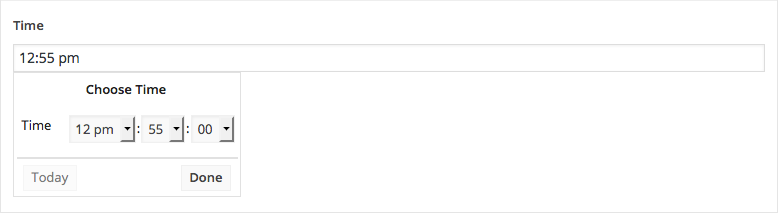](https://www.advancedcustomfields.com/wp-content/uploads/2016/05/acf-time-picker-field-interface.png)
The Time Picker field interface
[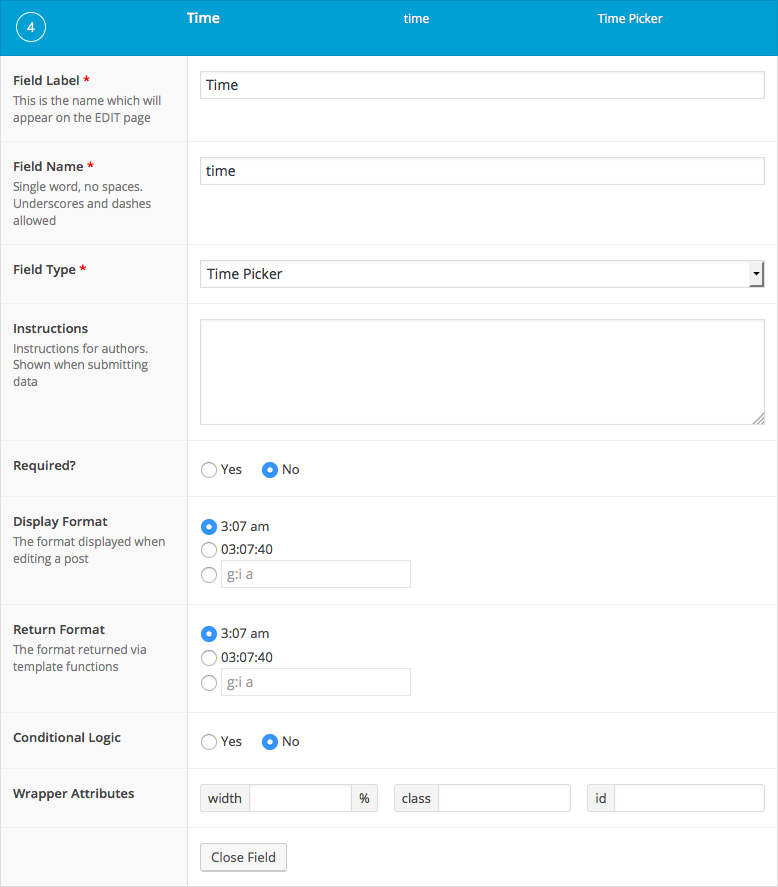](https://www.advancedcustomfields.com/wp-content/uploads/2016/05/acf-time-picker-field-settings.png)
The Time Picker field settings
## Changelog
- Added in version 5.3.9.
## Settings
- **Display Format**
The time format that is displayed when selecting a date.
- **Return Format**
The time format that is returned when loading the value.
## Template usage
The Time Picker field returns a string value using the *Return Format* setting.
### Display value
This example demonstrates how to display a time value.
```
Monday: -
```
### Query posts within time range
This example demonstrates how to query posts for all stores that are open.
It assumes a custom post type called ‘store’ exists with a custom field for each day’s open and close time in the following naming convention: ‘monday\_open\_time’, ‘monday\_close\_time’, ‘tuesday\_open\_time’, etc.
When working with the [meta\_query array](https://codex.wordpress.org/Class_Reference/WP_Query#Custom_Field_Parameters), remember that WordPress reads this as `$meta $compare $value` (eg. ‘monday\_open\_time’ < $time)
```
-1,
'post_type' => 'store',
'meta_query' => array(
'relation' => 'AND',
array(
'key' => $today.'_open_time',
'compare' => '<=',
'value' => $time,
'type' => 'TIME'
),
array(
'key' => $today.'_close_time',
'compare' => '>=',
'value' => $time,
'type' => 'TIME'
)
)
));
if( $posts ): ?>
Stores open now
-
post_title; ?>:
ID ); ?> - ID ); ?>
```
## Notes
### Database format
The value selected can be returned and displayed in different formats but will be saved to the database as ‘H:i:s’. This format is used throughout the WordPress database tables and will allow for straight-foward database querying.
### Time format strings
To customize the *Display Format* and *Return Format* settings further, refer to the full list of time format strings within the [PHP date() documentation](http://php.net/manual/en/function.date.php).